WebAssembly satisfies every developers desire 🤩 of writing ✍️ efficient code.
If you’re a frontend developer👨 , definitely you spend more time with javascript 👨🏾💻 than your wife 👰.
We always try to write high performance ⚡️code . But Javascript doesn’t allow us to do that in some cases, where the performance can still be improved.
One of that case is dynamic typing . We don’t have data types in javascript.If you ask a javascript developer about data types , He/she will say "We treat everyone the same way 😜". Javascript, will always interpret the data type on runtime . But not in all cases , V8 engine will solve this problem in some cases.
For performance improvement we need a new technology .WebAssembly is going to be the new technology.
It allows developers to write code on compiled languages like (C/C++/Rust) and compile it into low-level assembly-like language with a compact binary format(.wasm file) that runs with near-native performance on the web.
For compiling C/C++ code we can use Emscripten . A compiler toolchain to convert C/C++ to assembly-like language.
Let’s understand
- how javascript executed on the web and
- how emscripten convert C/C++ languages to assembly-like language
after that we deep dive 🏊♂️ into WebAssembly.
HISTORY OF JAVASCRIPT
If you don't believe in history then skip this section , and read about the future(WebAssembly) , below this section.
Introduced in 1995 .
Designed in 10 days 😳.
We know how the things will be, If we need to design a system in 10 days 🤓.So the point is it is not designed to be fast.
One of the reason for its slowness is dynamic typing and interpreted language.
After a decade Javascript is not satisfying for developers to meet the requirement of the web users.
So there is a need for new technology to speed up Javascript.
So developers at google developed the V8 engine .
Others also started designing the same .
- Google → V8 engine -> for chrome
- Apple → Nitro → Safari
- Mozilla → SpiderMonkey →Firefox.
- Opera → Carakan.
V8 compiles JavaScript directly to native machine code before executing it, instead of more traditional techniques such as interpreting bytecode or compiling the whole program to machine code.(source : Wikipedia )
The best part of V8 is, it has JIT(Just in time compiler in it ) , which will increase the performance of the code by monitoring the code.
HOW JIT INCREASES PERFORMANCE .
Js is an interpreted language which means every line is translated to machine code only when it is about to be executed.
What if, there is a huge operation is present inside a loop , then the same line is translated as many time as the loop runs .
The browser need to do something to speed up the execution on this case.
This is where the Profiler is introduced , which will note down 📝 which part of code is executed repeatedly and denotes with some tags 🏷 ,
- warm (same lines of code are run a few times) → Send to
JITand create a compiled version of code. - hot (runs a lot)→ the code is replaced with the
compiled version - very hot → it is again sent to
optimising compilerand get even faster version of the code.
Let’s have deeper look 🕵️♂️into JIT,
Consider that, if a part of code is getting warm, then it is send to the JIT and the JIT will compile each line of the function and store in a table with stub(reference of compiled version of code) , then the code is replaced with the stub in the table.
The stubs (reference to compiled version of javascript code ) are indexed based on the line number and variable type . (Consider there is an array which has two types of data , we are looping the data and performing some operation when the code gets warm the JIT will compile the code and for two types there will be separate compiled version of code stored in different index in the table).
If the code is very hot then it is sent to optimising compiler , it will give a blazing fast version of the code.
During creation of the high optimised code the compiler will assume something like the code is only for numbers or string or particular type. This condition is checked each time. If the condition is passed then, it runs compiled version. If the condition fails then it will execute based on the baseline compiled version or sent to interpreter.
If the bailing out process is performed many times then performance improvement is not performed for certain functions, so whenever we develop a javascript application it is better to keep out data and object properties in same format , so that the code will be optimised and will not bail-out more .
LET’S LOOK INTO HOW EMSCRIPTEN WORK.
If we know how High level languages are converted to machine code then we can easily understand how emscrripten works.
We write programs in High level languages(Javascript) , but how machine understands it ?
There comes the translator which converts the HLL to Machine code.But there are different machine architecture are available like x86 , ARM, so we need to translate our HLL code to machine code for each architecture.But we don’t want that , because we need to write separate translator for each architecture.
So how we can solve this problem is, we can convert the HLL to some specific format that format is called Intermediate Representation(IR).
The compiler’s frontend will take the HLL and convert it into IR and the backend will convert the IR to machine code .
The backend of the compiler will generate code according to the architecture of the compiler.
By this way most of the compiler’s backend remains the same , and whenever there is new language created , we are required to write only the frontend for translation .
For converting C to IR we need frontend , that we can use clang , which compile C to LLVM Intermediate representation.
Once the C is converted to LLVM IR format , LLVM will makes some optimisation on the code . From this point we need a backend to convert the IR to webAssembly code(assembly code).
But we don’t need to do this separately , because we have a tool called Emscripten, which will compile the C code to webassembly code.
What makes webbassembly more efficient ?
To understand this we need to know how the javascript code executed by javascript engine.
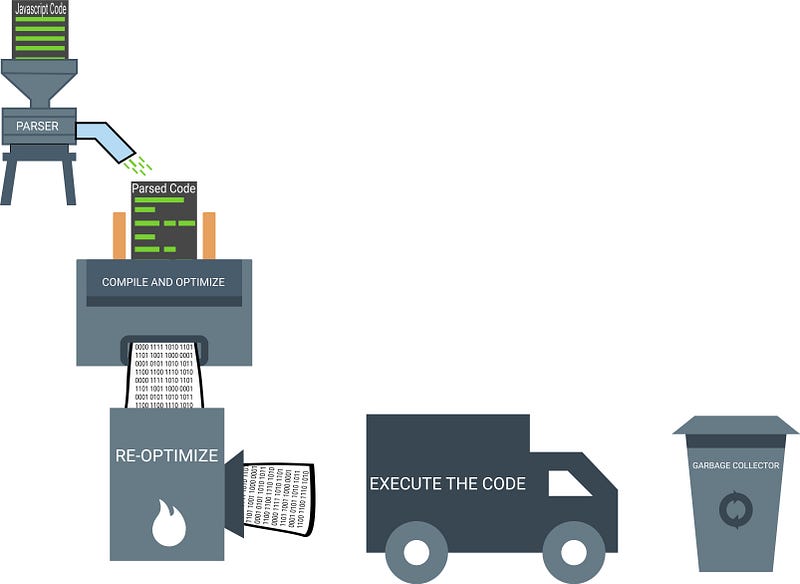
Steps on Executing the Javascript code.
- Parser → parse the source code into something (AST and scope)that the interpreter can run .
- Compiling & optimizing → Optimizes the code.
- Re-optimizing → JIT optimization.
- Execution → Execute the code.
- Garbage collection → clean uo 🧹 up unwanted memory.
So let’s look 👀 how webassembly code executes.

In webassembly(wasm)
- We fetch the .wasm file from the web mostly it takes few seconds, If the program is compiled with optimization then the size of the file will be less.
- Decode and parses the wasm code to Abstract Syntax Tree(AST) .
- Compile and Optimize the code , it takes only less time because it is already in the format of assembly code.
- There is no re-optimization.
- No garbage collection , garbage Collection should be handled manually.
Now, let’s make our hands 🖐 🤚 dirty with webassembly.
How to install webassembly .?

1. First install Git in your system .
MAC
In mac git is pre-installed. To test that you can check the in terminal by using the command
git --version
If you get an error , then your system doesn’t have git . You can install it in two steps.
1.Install mac-command-line tool.
xcode-select --install
//if you have already have mac-command-line-tool then it will throw error as
xcode-select: error: command line tools are already installed, use "Software Update" to install updates
So now we need to install git in your system.For that visit this link. Download the git installer and install it . Alternatively you can use homebrew .
WINDOWS
In windows you can install git by downloading git installer from here. Then install the .exe file downloaded. Then open a new terminal then check for git --version.
LINUX
Install using apt
sudo apt-get install git
2.Install Python
MAC
On Mac python 🐍 comes pre-installed. You need the python version ≥ 2.7 . To check the python version you can use
python -V
If you don’t have the version required . You can install it by downloading python package from here.
Emscripten requires version 2.7 , so install that or greater version.
WINDOWS
You can download the python from here. Install it, it is straight forward installation. Once you have installed add the python installed PATH to your environment variable.
LINUX
For installing python you need to install build-essential then install python.
sudo apt-get install build-essential
sudo apt-get install python
3 . Install CMake
MAC
In mac you have cmake pre-installed you can verify the version by checking
cmake --version
WINDOWS
In windows you can install CMake by downloading the CMake from here. You can download the CMake under the binary version listed in the website.
Install the downloaded CMake. Then open a new terminal and test
cmake --version // displays the version of the cmake installed.
LINUX
In most of the linux system the cmake is already installed if not then run
sudo apt-get install build-essential(if not previously done ✅ )
sudo apt-get install cmake
4. Install nodeJS
In windows and mac it comes with emscripten.
If you want to install yourself you can download node here. Install it.
In Linux
sudo apt-get install node
5.Install Emscripten
Installing emscripten is so simple and cool 😎
clone emscripten into your system.
git clone https://github.com/juj/emsdk.gitIt will download into your system under the folder emsdk.
cd emsdk
There is an executable file name emsdk(emscripten sdk) available in the emsdk folder , which will be used for updating and handling the emscripten packages 📦 .
First update the emsdk
emsdk upadte // you can also do this by git pull for updating emsdk
To install latest emsdk package use
emsdk install latest (On mac 💻 use : ./emsdk install latest )
It will take some time .
Once installed now activate the latest emsdk
emsdk activate latest (On mac 💻 use : ./emsdk activate latest )If you are on mac run
./emsdk_env.sh // to set environment path for emscripten
If you are on windows run
emsdk_env.bat // to set environment path for emscripten
Now all done ✅ .
Test emscripten by executing the command
emcc --version //displays current version
You have successfully installed Emscripten in your system.
If can have a more detailed explanation here for installing emscripten.
Let’s have a look at emscripten structure
So let’s write our first program.
- Write a C++ Program that returns sum of numbers
// test.cpp
extern "C" {
int main() {
return 0;
}
int add(int a, int b) {
return a+b;
    }
}
Write inside the scope of “C” to avoid name mangling in C++.
Now let’s compile our C code to get the wasm file ,
emcc test.cpp
-S WASM=1
"EXTRA"
-o test.js
--std=c++11
emcc → emscripten compiler that will compile c/c++ program to wasm.
-S → is used to set compiling options.
-S WASM=1 → will tell the compiler to produce wasm file while compiling .
-o test.js → It denotes the output file expected from the compiler.
--std=c++11 → tell the compiler to compile the program with c++11 standard.
Let’s have a look at how our C code is compiled by emscripten .

Emscripten is bundled with both front end and back end .
In front-end the C code is converted to Intermediate Representation(LLVM bitcode).
In back-end the IR code is converted into wasm code.
If we want the javaScript glue code , emscripten also handles that too . For that emscripten uses Fastcomp.
The wasm code generated can be changed to respective machine architecture code(x86, ARM) by browser.
When the compilation is done ✅ , emscipten will generate two files test.js and test.wasm . Load the test.js .
If you found helpful , surprise 🎁 me here.
I referred from , cartoon introduction to web-assembly by link clack . Lin Clark
 Js Jeep 🚙