Learn how to convert a string into camelCase in Javascript.

camelCase:
Camel case (stylized as camelCase; also known as camel caps or more
formally as medial capitals) is the practice of writing phrases such
that each word or abbreviation in the middle of the phrase begins
with a capital letter, with no intervening spaces or punctuation.
Example: eBay, iPhone
The above details is taken from wikipedia.
Steps to convert a string to 🐪 case
- Convert the input to string type
- Split the string into words. The splitting is not only based on space. We use regex to parse a string which will remove all special characters and split a string into two parts if a string has two capital letters and split the number part separate.
- Convert the first string to lowercase and capitalize the other string. Then join the strings.
First we need to convert the input to a string, just in case a non-string is passed into the function:
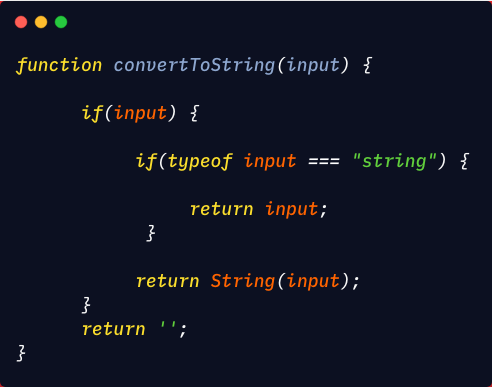
Now we need to split the input to separate words using RegEx:
/[A-ZxC0-xD6xD8-xDE]?[a-zxDF-xF6xF8-xFF]+|[A-ZxC0-xD6xD8-xDE]+(?![a-zxDF-xF6xF8-xFF])|d+/g
The explanation of the above RegEx can be found here.
What this will do is ,
For input: "Text is 123 test TText123test !!12 --!~@#$%%^&*( (test)"
The regular expression will match
[Text, is, 123, test, T, Text, 123, test, 12, test]
Now we can use the match method of the string object convert it to words using our RegEx.

Now that we have the string converted to words, we can convert it to camel case.
Let’s create a function that accepts an array of strings. For the string at index 0, convert all the characters of the string to lowercase. For all other strings in the array, convert only the first character of the string to uppercase and convert all other characters as lowercase.
Here we converted every element to lowercase on each iteration of the loop. If the index is not 0 then convert the first character as uppercase.
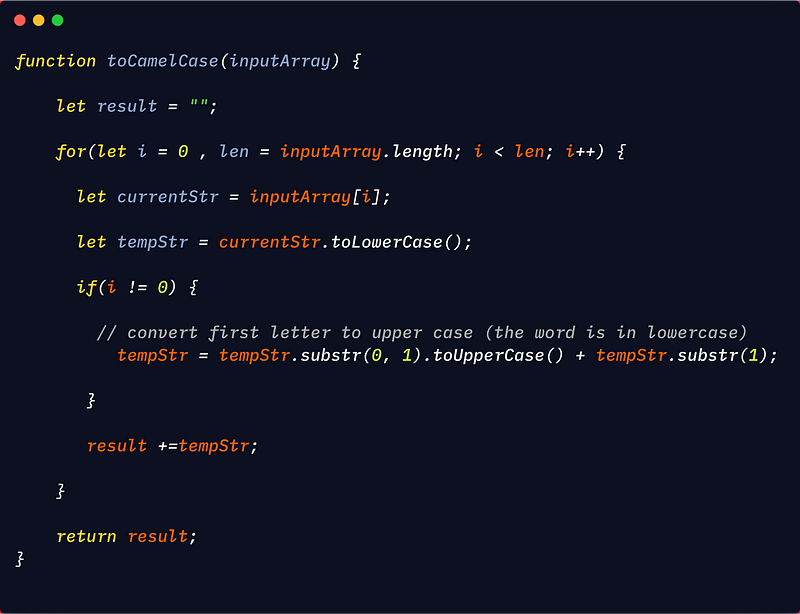
Now let’s combine all the above code:
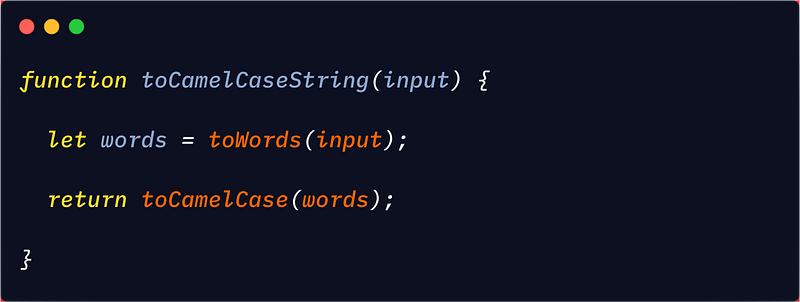
NOTE: This doesn’t work if the string contains character which are not ASCII. To support that, we need to use a more complex regular expression.
To accomplish this, we test if a string contains non-ASCII character:
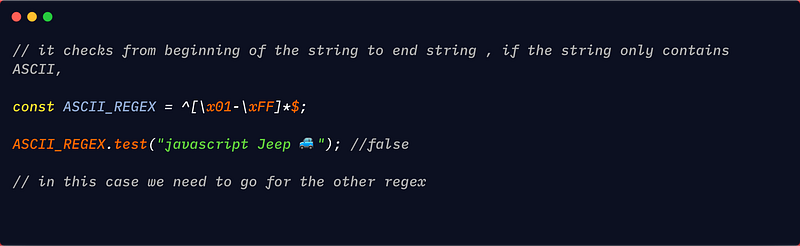
The RegEx to match non-ASCII code can be found here. To make it work with non-ASCII, simply replace the RegEx in the toWords function.
If you find this helpful surprise 🎁 me here.
Share if you feel happy 😃 😆 🙂 .
Follow Javascript Jeep🚙 if you feel worthy.
 Js Jeep 🚙