Learn about how to use and when to use Set in JavaScript.
The Set object allows you to create a collection of unique values(each value can occur only once).
Set can contain any type of value (primitives or object reference).
Set stores elements in the insertion order.
The Set doesn’t contain’s keys 🔑 like a Map object.
The uniqueness of elements of the Set are checked using the SameValueZero algorithm. This algorithm is similar to === (strict equal) except in one case where NaN === NaN evaluates to true, so that multiple NaN is not inserted in the Set.
Creating a Set
Syntax: new Set([iterable]) → returns a Set object.
The add() method appends the element passed to the end of a Set object and returns the Set object.
var fruits = new Set(['🍇', '🍉', '🍊', '🍈' ]);
fruits.add('🍋');
fruits; // Set(5) {'🍇', '🍉', '🍊', '🍈', '🍋'};
When we try to add duplicate values it is not inserted.
fruits.add('🍊'); // already present in the set
fruits; // Set(5) {'🍇', '🍉', '🍊', '🍈', '🍋'};
The add method is chain-able
fruits
      .add('🍌')
      .add('🍓')
      .add('🍎');
fruits; // Set(8) {"🍇", "🍉", "🍊", "🍈", "🍋", …}
Adding objects to Set
var set = new Set();
set.add({i : 10});
set.add({i : 10});
set; //Set(2) {{…}, {…}}
// Even-though objects look same, each object has different reference, so they are not ===
// An object reference means that it compares the memory address of the object and not the actual key/value pairs contained in the object.
for(var [key ,value] of fruits.entries()) {
   console.log(key, value);
}
delete()
The delete() method removes the specified element from a Set object.
Syntax : delete(valueToBeDeleted)
Returns true if an element in the Set is deleted, otherwise it returns false.
var fruits = new Set(['🍇', '🍉']);
fruits.delete('🍇'); //true
fruits; //Set(1) {"🍉"}
fruits.delete('🍌'); false.
clear()
The clear()method empties theSet object.
var fruits = new Set(['🍇', '🍉']);
fruits.size; // 2
fruits.clear();
fruits.size; // 0
Using forEachon a Setobject:
let print= function(key , value, set) {
console.log(value);
}
var fruits = new Set(['🍇', '🍉']);
fruits.forEach(print)
//output
🍇
🍉
Tips and Tricks
When we pass a string as an argument when creating a Set, then it creates a set with all characters as separate elements.
var text = 'LEARN';
var mySet = new Set(text);
//Set(5) {"L", "E", "A", "R", "N"}
2. Removing duplicate elements from an array
var names= [ 'John', 'Brandi', 'Tony', 'John'];
var uniqueNames = [...new Set(names)]
uniqueNames = [ 'John', 'Brandi', 'Tony'];
3. How array and set are different
Set objects store unique values, whereas array can have duplicate values
In an array, we need to use the indexOf method to check the availability of element in the array, but in a set we can use the hasmethod, which is compared to be faster than indexOf method.
The value NaN cannot be found with indexOf in an array.
Set objects let you delete elements by their value. With an array, you would have to splice based on an element’s index.
UIGradient is a community contributed collection of beautiful multi-color gradients. You can easily generate gradients , rotate and download the gradient as image . They also provide some open source libraries for iOS, react, etc., .Link to their repo is here
This is a great website which allows us to select the color , direction . This website also generate 3 coloured gradients . It has color selector and we can easily select colours from there.
This is more powerful than above two because you can add any number of colours to the gradient , it generates both the linear and radial gradient color , with the css code. This website also have a detailed explanation about the gradients on their page itself.
This website has a clean and neat design , even a person who doesn’t know what is gradient can easily generate gradients , because the design is so simple and understandable . It also generate random gradient colours.But we can’t create a rotated gradient in this website.
This is a website that has a huge list of linear , radial gradients, it also list most popular gradient list . It is not the website for creating gradient colours.We can use the color listed. They also provide an chrome extension
This website is similar to the gradienthunt.com , But its design is more attractive .It allows us to download the gradient as Png file.This website also offers us a .sketch and .psd file which contains gradient colours as free 😎 .
A Map is a collection of key🔑 — value pairs, similar to an object. It stores the key🔑 — value pairs in the insertion order.
We can create a Map by passing an iterable object whose elements are in the form of key🔑 — value (Eg. [ [1,”one”], [2,”two”] ] ), or you can create an empty Map, then insert entries.
Why we need Map if we have Object s
A Map is similar to Object, but any value can be used as key in maps, but keys in objects are only Strings and Symbols
2. The key🔑 — value pairs in Map maintains the insertion order, whereas Object don’t.
3. You can get the size of the Map, but we don’t have a built-in method to get size in Object (but we can do it manually).
4. Maps are iterable, whereas an Object is not iterable by-default.
5. Maps have additional methods not available to normal objects
Methods in Maps
Map cheatsheet
Example:
Different Ways to create maps
2. Map methods
Let’s create simple Map:
// creating a map
var fruits = new Map();
fruits.set('🍎', "Apple");
fruits.set('🍋', "Mango");
fruits; //{"🍎" => "Apple", "🍋" => "Mango"}
Map has a property size which returns the current Map size (total number of entries).
// size
fruits.size; // 2
set(🔑, value)→ Set the value for the key in the Map and returns the Map. If the key is already present in the map, then the value is overwritten.
clear() → Delete all key🔑-value pairs from the Map.
// clear
fruits.clear(); // deletes all element
fruits; // Map(0) {}
Things you should know about Map
You can use any value (object or function or primitive ) as a key in the Map . Map uses the SameValueZero algorithm. It is similar to strict equality (===) but the difference is that NaN is considered equal to NaN (i.e, NaN === NaN → true.In normal JS, this is not true. In this case NaN can be used as key and we don’t have any duplicate NaN).
Learn about date and time in Javascript by creating some cool 😎 stuffs
Javascript has a built-in Date object to handle all the time and date related operations. For example, you can display the current date/time, create a calendar, build a Pomodoro timer, code out a 🛑 stop-watch, and much more.
Creating a Date Object
We can create a Date object using the new operator.
This method returns the current date with the time and timezone.
There are 3 other ways to create a Date when using the new keyword:
Creating a Date object with milliseconds
We can create a date object by passing the Date object a timestamp number in milliseconds. For example, new Date(1572840117245).
When we create a date object by passing it 0 milliseconds, it will return the date object for Jan 01 1970 05:30:00. This is the Linux Epoch date/time.
Computers’ time are based on Linux Epoch(Jan 01 1970 05:30:00).
Since zero milliseconds corresponds to this starting point, any value larger is the number of milliseconds since the Linux Epoch.
Note: If the concept of the Linux Epoch is confusing, then keep reading. We’ll see further in the article how we can get the current timestamp from the epoch in JS. Using the Linux Epoch time is a very common technique in programming because it gives us an exact reference point for comparison.
Let’s extend this demonstration further. There are 31 days in January and 24 hours for each day and 60 mins for each hour and 60 sec for each minute and 1000 milliseconds for each second.
So, let’s pass 31 * 24 * 60 * 60 * 1000 = 2678400000 to the Date object. As expected, the result is Feb 1 of 1970 which is a month after the Linux Epoch.
2. Creating a Date object by passing each value
3. Creating Date object using dateString
We can create a Date object by passing the string representation of the date. The string representation is accepted if it is able to be parsed using Date.parse().
The allowed format is YYYY-MM-DDTHH:mm:ss.sssZ
YYYY → year
MM → month
DD → day
T → date and time separator
HH → hours
mm → minutes
ss →seconds
sss → milliseconds
Z → Timezone
Using the Date Object Methods to Get and Update a Date
The Date object that we created in the last section provides many methods to get and update (set) dates.
First, let’s learn the get methods:
Examples
We can change the date by using the set methods on the Date object.
Examples
Tricks for the Date Object
To get the current time in milliseconds, we can use the Date.now method which will return the total milliseconds since the Linux Epoch.
Date.now(); // 1572840117245
Using that time, you can call new Date(1572840117245) and you will see that it corresponds to the current date.
2. To get a formatted string, use the toDateString method:
var dt = new Date(22,5,1997);
dt.toDateString() // Sun Jun 22 1997
3. Find the total number of days in a month in Javascript.
We need to create a function that takes month (months are indexed as 0–11 in JS) and a year as an argument, and we need to return the number of days in that month.
When we create a Date object with year and month, the day of the month is set to 1.
So if we pass new Date(5,2019) then it returns a date object for 1st June 2019.
There can be no month which can have more that 31 days. So if we set the date as 32, then
If the current month has 31 days → it points to next month first day,
If the current month has 30 days → it points to next month second day,
If the current month has 29 days → it points to next month third day,
If the current month has 28 days → it points to next month fourth day,
Example:
var d = new Date(2019, 0, 32); // Feb 01 2019
d.getDate(); // 1 (because Jan 2019 has 31 days)
var d = new Date(2019, 1, 32); Mar 04 2019
d.getDate(); // 4 (because Feb 2019 has 28 days)
If we again subtract the current date from 32 then we get the number of days in the month provided.
So let’s create a function that returns the number of days when we pass the year and month:
And those are the key features of the Date object in JavaScript!
How to use ccall, cwrap in emscripten to call the exported function like Javascript functions.
This is Part-3 of WebAssembly Tutorial , You can read Part 1 and Part 2 , which gives you the picture of what is webAssembly.
Let’s write a simple C++ program with some functions
// test.cpp
#include<iostream>
using namespace std;
extern "C" {
int square(int n) {
       return n * n;
    }

 }
Compile the above program with the emccc
Once it is compiled load the test.js file generated in your html file.
Now we can call the exported functions in 3 ways
Using Module object
Using ccall emscripten in-built function
Using cwrap emscripten in-built function
Calling the Exported function using Module Object
Module._square(💯);
//10000
Calling the Exported function using ccall & cwrap
ccall & cwrapare in-built function in emscripten, The ccall & cwrap function will be exported ,by-default by the emscripten , if you don’t set any optimization while compiling . If there is any optimation option is set during the compilation , this functions is not exported to our Module object by-default. In those cases, ccall & cwrap functions are not exported, we can manually tell emscripten to export the ccall & cwrap function during compilation by setting the option -s "EXTRA_EXPORTED_RUNTIME_METHODS=['ccall', 'cwrap']” .
1.Command to compile the code
Now in your html file inside the script tag you can call the exported function using the ccall.
When you are using we don’t need to add _ in front of the function name.
Don’t forget to add [] to argument types & arguments .
`onRuntimeInitialized is an event that is triggered when the wasm is loaded. By using this method , we can confirm that all C function are executed only after the wasm is loaded.
We can also pass string and return string using ccall.
In this tutorial we will learn how to create a calculator in WebAssembly.
If you aren’t aware of WebAssembly then you can learn here .
First let’s write our C program.
// calculator.cpp
#include<stdio.h>
extern "C" {
double calculate(double num1, double num2, int operation) {
double result = 0;
switch(operation) {
       case 1 :
              result = num1 + num2;
              break;
         case 2:
            result = num1 -num2;
            break;
         case 3:
            result = num1 *num2;
            break;
         case 4:
            result = num1 /num2;
            break;
}
return result;
    }
}
To compile this program using emscripten you can use the command
calculator.cpp is the file which we are going to compile ,
-o → output file , we are requesting emcc to give output as calculator.js
-s WASM =1, →We are requesting emscripten to generate .wasm file, If we want to request emscripten anything, you need to use -sbefore the option.
-s “EXPORTED_FUNCTIONS=[‘_calculate’]” → We are saying emscripten to export the calculate function to the Module object. We need to add _ before the function_name .
Now it will generate two files calculator.js and calculator.wasm .
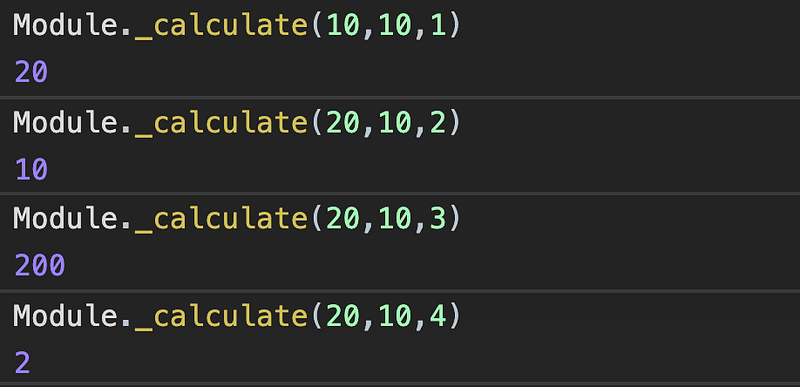
The emscipten will bind all the function under the Moduleobject. You can access your function using the Module object . eg : Module._calculate(10,10,3);
Now create need to create a html file to load the .js file.
The calculator.js file will load the calculator.wasm file. Keep the js and wasm file in the same folder.
Now we have all the files , inside the calculator.js the calculator.wasm .file is is loaded using fetch api. So now we need to create a server to serve the wasm file to the fetch call.
You can use live server plugin in your IDE to serve the files.
Or
You can use npm with express to create a server,
Steps to create server
install node
// now create a node project
npm init
//then install express by
npm install express@latest // this install latest version of express
WebAssembly satisfies every developers desire 🤩 of writing ✍️ efficient code.
If you’re a frontend developer👨 , definitely you spend more time with javascript 👨🏾💻 than your wife 👰.
We always try to write high performance ⚡️code . But Javascript doesn’t allow us to do that in some cases, where the performance can still be improved.
One of that case is dynamic typing . We don’t have data types in javascript.If you ask a javascript developer about data types , He/she will say "We treat everyone the same way 😜".Javascript, will always interpret the data type on runtime . But not in all cases , V8 engine will solve this problem in some cases.
For performance improvement we need a new technology .WebAssembly is going to be the new technology.
It allows developers to write code on compiled languages like (C/C++/Rust) and compile it into low-level assembly-like language with a compact binary format(.wasm file) that runs with near-native performance on the web.
For compiling C/C++ code we can use Emscripten . A compiler toolchain to convert C/C++ to assembly-like language.
Let’s understand
how javascript executed on the web and
how emscripten convert C/C++ languages to assembly-like language
after that we deep dive 🏊♂️ into WebAssembly.
HISTORY OF JAVASCRIPT
If you don't believe in history then skip this section , and read about the future(WebAssembly) , below this section.
Introduced in 1995 .
Designed in 10 days 😳.
We know how the things will be, If we need to design a system in 10 days 🤓.So the point is it is not designed to be fast.
One of the reason for its slowness is dynamic typing and interpreted language.
After a decade Javascript is not satisfying for developers to meet the requirement of the web users.
So there is a need for new technology to speed up Javascript.
So developers at google developed the V8 engine .
Others also started designing the same .
Google → V8 engine -> for chrome
Apple → Nitro → Safari
Mozilla → SpiderMonkey →Firefox.
Opera → Carakan.
V8 compiles JavaScript directly to native machine code before executing it, instead of more traditional techniques such as interpretingbytecode or compiling the whole program to machine code.(source : Wikipedia )
The best part of V8 is, it has JIT(Just in time compiler in it ) , which will increase the performance of the code by monitoring the code.
HOW JIT INCREASES PERFORMANCE .
Js is an interpreted language which means every line is translated to machine code only when it is about to be executed.
What if, there is a huge operation is present inside a loop , then the same line is translated as many time as the loop runs .
The browser need to do something to speed up the execution on this case.
This is where the Profiler is introduced , which will note down 📝 which part of code is executed repeatedly and denotes with some tags 🏷 ,
warm (same lines of code are run a few times) → Send to JIT and create a compiled version of code.
hot (runs a lot)→ the code is replaced with the compiled version
very hot → it is again sent to optimising compiler and get even faster version of the code.
Let’s have deeper look 🕵️♂️into JIT,
Consider that, if a part of code is getting warm, then it is send to the JIT and the JIT will compile each line of the function and store in a table with stub(reference of compiled version of code) , then the code is replaced with the stub in the table.
The stubs (reference to compiled version of javascript code ) are indexed based on the line number and variable type . (Consider there is an array which has two types of data , we are looping the data and performing some operation when the code gets warm the JIT will compile the code and for two types there will be separate compiled version of code stored in different index in the table).
If the code is very hot then it is sent to optimising compiler , it will give a blazing fast version of the code.
During creation of the high optimised code the compiler will assume something like the code is only for numbers or string or particular type. This condition is checked each time. If the condition is passed then, it runs compiled version. If the condition fails then it will execute based on the baseline compiled version or sent to interpreter.
If the bailing out process is performed many times then performance improvement is not performed for certain functions, so whenever we develop a javascript application it is better to keep out data and object properties in same format , so that the code will be optimised and will not bail-out more .
LET’S LOOK INTO HOW EMSCRIPTEN WORK.
If we know how High level languages are converted to machine code then we can easily understand how emscrripten works.
We write programs in High level languages(Javascript) , but how machine understands it ?
There comes the translator which converts the HLL to Machine code.But there are different machine architecture are available like x86 , ARM, so we need to translate our HLL code to machine code for each architecture.But we don’t want that , because we need to write separate translator for each architecture.
So how we can solve this problem is, we can convert the HLL to some specific format that format is called Intermediate Representation(IR).
The compiler’s frontend will take the HLL and convert it into IR and the backend will convert the IR to machine code .
The backend of the compiler will generate code according to the architecture of the compiler.
By this way most of the compiler’s backend remains the same , and whenever there is new language created , we are required to write only the frontend for translation .
For converting C to IR we need frontend , that we can use clang , which compile C to LLVM Intermediate representation.
Once the C is converted to LLVM IR format , LLVM will makes some optimisation on the code . From this point we need a backend to convert the IR to webAssembly code(assembly code).
But we don’t need to do this separately , because we have a tool called Emscripten, which will compile the C code to webassembly code.
What makes webbassembly more efficient ?
To understand this we need to know how the javascript code executed by javascript engine.
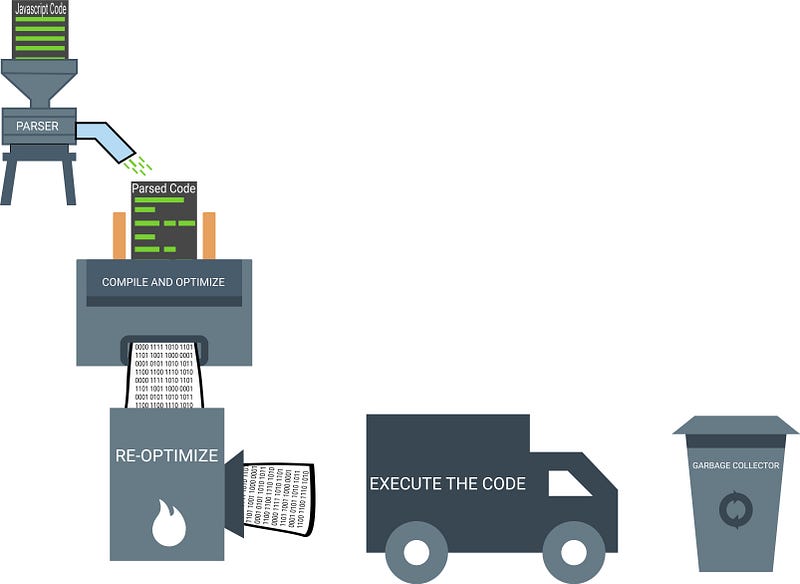
Steps on Executing the Javascript code.
Parser → parse the source code into something (AST and scope)that the interpreter can run .
Compiling & optimizing → Optimizes the code.
Re-optimizing → JIT optimization.
Execution → Execute the code.
Garbage collection → clean uo 🧹 up unwanted memory.
So let’s look 👀 how webassembly code executes.
In webassembly(wasm)
We fetch the .wasm file from the web mostly it takes few seconds, If the program is compiled with optimization then the size of the file will be less.
Decode and parses the wasm code to Abstract Syntax Tree(AST) .
Compile and Optimize the code , it takes only less time because it is already in the format of assembly code.
There is no re-optimization.
No garbage collection , garbage Collection should be handled manually.
Now, let’s make our hands 🖐 🤚 dirty with webassembly.
How to install webassembly .?
REQUIREMENTS FOR INSTALLING EMSCRIPTEN.
1. First install Git in your system .
MAC
In mac git is pre-installed. To test that you can check the in terminal by using the command
git --version
If you get an error , then your system doesn’t have git . You can install it in two steps.
1.Install mac-command-line tool.
xcode-select --install
//if you have already have mac-command-line-tool then it will throw error as
xcode-select: error: command line tools are already installed, use "Software Update" to install updates
So now we need to install git in your system.For that visit this link. Download the git installer and install it . Alternatively you can use homebrew .
WINDOWS
In windows you can install git by downloading git installer from here. Then install the .exe file downloaded. Then open a new terminal then check for git --version.
LINUX
Install using apt
sudo apt-get install git
2.Install Python
MAC
On Mac python 🐍 comes pre-installed. You need the python version ≥ 2.7 . To check the python version you can use
python -V
If you don’t have the version required . You can install it by downloading python package from here.
Emscripten requires version 2.7 , so install that or greater version.
WINDOWS
You can download the python from here. Install it, it is straight forward installation. Once you have installed add the python installed PATH to your environment variable.
LINUX
For installing python you need to install build-essential then install python.
sudo apt-get install build-essential
sudo apt-get install python
3 . Install CMake
MAC
In mac you have cmake pre-installed you can verify the version by checking
cmake --version
WINDOWS
In windows you can install CMake by downloading the CMake from here. You can download the CMake under the binary version listed in the website.
Install the downloaded CMake. Then open a new terminal and test
cmake --version // displays the version of the cmake installed.
LINUX
In most of the linux system the cmake is already installed if not then run
sudo apt-get install build-essential(if not previously done ✅ )
sudo apt-get install cmake
4. Install nodeJS
In windows and mac it comes with emscripten.
If you want to install yourself you can download node here. Install it.
It will download into your system under the folder emsdk.
cd emsdk
There is an executable file name emsdk(emscripten sdk) available in the emsdk folder , which will be used for updating and handling the emscripten packages 📦 .
First update the emsdk
emsdk upadte // you can also do this by git pull for updating emsdk
To install latest emsdk package use
emsdk install latest (On mac 💻 use : ./emsdk install latest )
It will take some time .
Once installed now activate the latest emsdk
emsdk activate latest (On mac 💻 use : ./emsdk activate latest )
If you are on mac run
./emsdk_env.sh // to set environment path for emscripten
If you are on windows run
emsdk_env.bat // to set environment path for emscripten
Now all done ✅ .
Test emscripten by executing the command
emcc --version //displays current version
You have successfully installed Emscripten in your system.
If can have a more detailed explanation here for installing emscripten.
Let’s have a look at emscripten structure
So let’s write our first program.
Write a C++ Program that returns sum of numbers
// test.cpp
extern "C" {
int main() {
return 0;
}
int add(int a, int b) {
return a+b;
} }
Write inside the scope of “C” to avoid name mangling in C++.
Now let’s compile our C code to get the wasm file ,
emcc test.cpp
-S WASM=1
"EXTRA"
-o test.js
--std=c++11
emcc → emscripten compiler that will compile c/c++ program to wasm.
-S → is used to set compiling options.
-S WASM=1 → will tell the compiler to produce wasm file while compiling .
-o test.js → It denotes the output file expected from the compiler.
--std=c++11 → tell the compiler to compile the program with c++11 standard.
Let’s have a look at how our C code is compiled by emscripten .
Emscripten is bundled with both front end and back end .
In front-end the C code is converted to Intermediate Representation(LLVM bitcode).
In back-end the IR code is converted into wasm code.
If we want the javaScript glue code , emscripten also handles that too . For that emscripten uses Fastcomp.
The wasm code generated can be changed to respective machine architecture code(x86, ARM) by browser.
When the compilation is done ✅ , emscipten will generate two files test.js and test.wasm . Load the test.js .
Learn about what is the right way to delete an array in Javascript.
Let’s create an Array
let array = [1,2,3,4,5];
First way to delete an array is , referencing to a new empty array
array = [];
Let’s look an example
var array1 = [1,2,3,4,5];
var array2 = array1;
array1[0] = 100;
array2[0]; //100 because array1 & array2 points to same reference.
// empty the array
array1 = [];
print the array
array1 ; //[]
array2 ; //[100,2,3,4,5]
So if we empty the array1 by setting the reference to an empty array , will change the reference of array1 to new empty array but the second array points to the old reference. In some cases you need both the array need to deleted for that case use second way.
Second way is to set the length of the array to 0. So it alters the array reference itself.
array.length = 0;
Example
var array1 = [1,2,3,4,5]
var array2 = array1;
array1[0] = 100;
array2[0]; //100 because array1 & array to points to same reference.
// empty the array
array1.length = 0; //alters array reference so both array is removed
console.log( array1 ) ; //[]
console.log( array2 ) ; //[]
Now if we set ,
array1[0] = "Javascript Jeep 🚙💨 ";
console.log( array2[0] ); //"Javascript Jeep 🚙💨"
// because still both array points to same array.
You can choose , which way suits you.
If you want to copy an array by value and not by reference then you can use Array.from() .
var array = [1,2,3,4,5]
var copyArrayByReference = array;
var copyArrayByValues = Array.from(array);
array[0] = 100;
console.log(copyArrayByReference[0]); // 100
console.log(copyArrayByValues[0]); // 1
For more detailed and complete reference to Arrays in javascript read here.
If you know more ways to delete an array please mention it . Follow Javascript Jeep🚙.
Let’s create an input checkbox with label, so that we can change the label as switch and turn on the switch when the checkbox is checked and turn off when it is unchecked.
The label is placed below the input so that we can select the label using the adjacent selector(+) .
Now the checkbox is created.
Now we need to change the labelposition as relative , so that we can make use of label::after and style that to appear like a switch.Also set the display : inline-block; so that we can apply width and height for the label.
.switch {
position : relative ;
display : inline-block;
width : 40px;
height : 20px;
background-color: #eee;
border-radius: 20px;
}
Now the toggle switch looks like ,
Let’s add the circle ⭕️ to the toggle switch using ::afterpseudo class.
.switch::after {
content: '';
position: absolute;
width: 18px;
height: 18px;
border-radius: 50%;
background-color: white;
top: 1px; // TO GIVE AN EFFECT OF CIRCLE INSIDE SWITCH.
left: 1px;
transition: all 0.3s;
}
Now the switch looks like
Now we need to change the background color and position of circle when the checkbox is selected , for that let’s use :checked property on input. if the input box is checked then change the background color of label and change the position of the circle.
.checkbox:checked + .switch::after {
left : 20px;
}
.checkbox:checked + .switch {
background-color: #7983ff;
}
Now when the checkbox is checked the input looks like
Learn all the methods available to Arrays in Javascript.
Different ways of creating an array
var array = [];
var array = Array();
var array = Array(3); // array of length 3
var array = new Array()
var array = new Array(3) // array of length 3
1. Array.from()
The Array.from method creates a new shallow copy from an array-like or iterable object.
Shallow copy is a bit-wise copy of an object. A new object is created that has an exact copy of the values in the original object. If any of the fields of the object are references to other objects, just the reference addresses are copied i.e., only the memory address is copied.
The value is change to Sam in the copied array because it is shallow copied.
This also behave the same for, array inside an array:
var array = [[1,2]]
var newArray = Array.from(array);
array[0][0] = 5;
newArray ; [[5,2]]
Example 4: Creating a new array of unique values from the array with duplicate values.
var array = [1,2,3,4,5,5,4,3,2,1];
var set = new Set(array); // removes duplicate elements
var uniqueArray = Array.from(set) // [1,2,3,4,5]
Example 5: Using the map function.
var array = [1,2,3,4,5]
var doubledArray = Array.from(array, (value, index) => value+value);
doubledArray; [2,4,6,8,10];
In example 5, we can also create an Array from the object if the object has the property of length. If an object has a property of length Array.from methods thinks it is an iterable object and creates an array of that length and sets the value as undefined.
This method merges the array or value passed and creates a new array. The array returned is the shallow copy of the arguments passed.
array1.concat[array2, arr3, arr4, .... arrN]
Example 1: Concat two arrays
var array = [1,2,3]
var newArr = array.concat([7,8,9],[4,5,6]); //[1,2,3,7,8,9,4,5,6]
Example 2: We can also pass the primitive values or object as arguments
var array = [1]
var newArr = array.concat("str",100,{obj:100})//[1,"str", {...}].
Example 3: Concatenation of array of arrays
var arr = [1,2];
var arr2 = [[1,2], [3,4]]
var newArr = arr.concat(arr2) // [1,2,[1,2],[3,4]]
The new Array is the shallow copy of the arguments so if we change the source it affects the copied object.
arr2[0][1] = 9; //[1,2,[1,9],[3,4]]
5. Array.keys
The keys() method returns a new Array Iterator object that contains the indexes of the array.
var arr= [1,2,3];
var keys= arr.keys(); // it returns an Array iterator

console.log(...keys)
The difference between Object.keys() and Array.keys() is that Array.keys() also take holes as an index;
var arr = [1,,3];
Object.keys(arr); // [0,2]
console.log(...arr.keys()) // 0,1,2
// undefined is not a hole
var arr = [1, undefined, 2]
Object.keys(arr); // [0,1,2]
console.log(...arr.keys()) // 0,1,2
6. Array.values()
Array.values() method returns an Array iterator object that contains the values of the array. By using the iterator we can iterate through all the values of the array.
var array = ['🚒', '🚐', '🚚', '🚲'];
var arrayIterator = array.values(); // Array iterator
console.log(...arrayIterator) // 🚒,🚐,🚚,🚲
// or we can iterate through iterator using for ... of
for (let vehicle of arrayIterator) {
console.log(vehicle);
}
output : 🚒,🚐,🚚,🚲
7. Array.entries()
The entries method returns return an Array Iterator which contains the index-value pair of the array.
The key is the index of the array and the value is the value at that index.
var array = ['a', 'b', 'c'];
var iterator = array.entries();
console.log(...iterator)
// [0, "a"] [1, "b"] [2, "c"]
or we can use for..of
for (let entry of iterator) {
  console.log(entry);
}
//  output
[0, "a"]
[1, "b"]
[2, "c"]
or We can use destructing
for (const [index, element] of iterator )
  console.log(index, element);
// output
0 "a"
1 "b"
2 "c"
8. Array.push()
The push method adds elements to the end of the array. It mutates the original array.
The push method returns the new length of the array after the item is pushed.
The unshift() method is the same as the push method, but the only difference is that it adds elements to the beginning of the array. It mutates the original array.
The unshift method returns the new length of the array after the item is added.
The indexOf method tests only for values and it doesn’t work for reference.
var a = [[1,2,3],3,4,5];
a.indexOf([1,2,3]); // -1
var a= [{},1,2,3];
a.indexOf({}); // -1
15. Array.lastIndexOf()
This method is similar to the indexOf method, but instead of returning the first index of the element passed, this method returns last index of the element in the array.
This method takes an input value and returns the last index of the passed value in the array.
If the element is not found then it returns -1.
We can also specify the index from which we need to start searching.
This method search the element by using strict equality (===) checking.
Syntax: lastIndexOf(elementToSearch, fromIndex) .
Here the fromIndex specifies the index from which the search takes place in backward. When the index is negative, the array is still searched from back to front.
If we pass -1 then it starts the search from the last element of the array towards the first element.
var array= [1, 2, 3, 4];
array.lastIndexOf(2); // 1
array.lastIndexOf(7); // -1
array.lastIndexOf(4, 3); // 3
array.lastIndexOf(2, 2); // 1
array.lastIndexOf(2, -2); // 1
array.lastIndexOf(2, -1); // 1
array.lastIndexOf(2,-5); //-1
16. Array.findIndex()
This method returns the first element that satisfies the passed testing function.
If no element satisfies the condition then it returns -1.
Example: Find if an array contains even an number.
var array = [1,3,5,7,10];
function containsEven(value) {
return value % 2 === 0;
}
array.findIndex(containsEven); // 4
// we can simplify the above function as
array.findIndex(val => val%2===0 )
17. Array.includes()
This method test whether an element is present in the array. If it is in the array then it returns true else returns false.
This method follows same concept of Array.indexOf method.
Syntax: includes(elementToSearch, fromIndex)
[1, 2, 3].includes(2); // true
[1, 2, 3].includes(4); // false
[1, 2, 3].includes(3, 2); // true
[1, 2, 3].includes(3, -1); // true
[1, 2, 3].includes(3, 3); // false
[1, 2, undefined].includes(undefined); // true
[1, 2, NaN].includes(NaN); // true
18. Array.reverse()
This method reverse the array. This function mutates/reverses the original array.
This method returns the reversed array.
const array = [1, 2, 3];

console.log(array); // [1, 2, 3]

array.reverse();

console.log(array); // [3, 2, 1]
19. Array.flat()
This method flattens a multidimensional array and returns the flattened array.
We can specify the depth value which denotes how deep the flatten should happen. The default depth value is one. ☝
This method returns a new array with the sub-array elements concatenated into it.
Example 1:
var array = [1,2,3,4,[1,2]]
var newArray = array.flat(); //[1,2,3,4,1,2]
Example 2 :
var array = [1, 2, 3, 4, [1, 2, [5, 6]] ]
// here the depth is 1 , so the [5,6] is not flattened
var newArray = array.flat(); //[1,2,3,4,1,2, [5,6] ]
// when we set depth to 2 , it also flatten the [5,6] element
newArray = array.flat(2); // [1,2,3,4,1,2,5,6]
Example 3:
When we flat an array with holes, the holes are removed.
var arr = [1,,2,3]
var newArray = arr.flat(); //[1,2,3]
20.Array.flatMap()
This method is similar to flat(), but the difference is that before flattening the array, each element of the array is mapped with the mapping function then it is flattened.
Another difference is that flatMap compared to flat only flattens to a depth of 1. We can’t specify how deep the flatten should happen.
Syntax:
var new_array = arr.flatMap(
  mapFunc,
  this(optional)
);
// Syntax for the map function
mapFunction(
val,
  index (optional),
  array (optional)
)
Example: Convert all the numbers on the array into even then flatten the array
var array = [1,2,3,4,5,10];
function mapFunc(val) {
// logic: if val = 3 => 3%2=1 then 3+1-> returns 4
return (val % 2) ? val +1 : val;
}
var newArray = array.flatMap(mapFunc);
In flatMap only the first level is flattened.
21. Array.some()
The array.somemethod checks whether any one of the elements in an array return true for the test function provided.
some returns true if any element passes the test, otherwise it returns false.
array.some(testFunction , thisArg(optional));
Example :
function isOdd(value, index, array) {
  return value %2;
}

[2, 6, 8, 0, 4].some(isOdd);  // false
[12, 5, 8, 1, 4].some(isOdd); // true
If the array.some method is executed against an empty array, it returns false.
[].some(isOdd); //false
If we didn’t pass the testingFunction, then it will throw an error.
22. Array.every()
The array.everymethod checks whether all elements of the array returns truefor the test function provided.
It returns true if all elements pass the test, otherwise it returns false if any one of the elements fails.
array.every(testFunction , thisArg(optional));
Example :
function isOdd(value, index, array) {
return value %2;
}
[1, 7, 8, 1, 5].every(isOdd); // false
[11, 5, 9, 1, 7].every(isOdd); // true
If the array.everymethod is executed against empty array , it returns false
[].every(isOdd); //true
If we didn’t pass the testingFunction, then it will throws an error.
23. Array.sort()
The sort method sorts the elements of the array and returns the sorted array.
We can pass compareFunction to implement custom sorting of the array.
Syntax : sort(compareFunction)
Here the compareFunction passed as an argument is optional.
Example: Without passing a compareFunction. The default sorting of the array is based on the string representation. Read the description in the example if this doesn’t make sense.
Example of default sorting.
var arr = [1, 2, 3, 200, 100];
arr.sort()
arr ; // [1, 100, 2, 200, 3]
The reason for the above result is, by default, sorting is based on strings. It first it converts the value to the string, then values are compared by their sequences of UTF-16 code units values.
The accumulator is the final output returned by the reducer function.
Example sum of array elements:
var array = [1,2,3,4,5]
function reducerFunction(accumulator, value) {
return accumulator + value;
}
var sum = array.reduce(reducerFunction) ; //15
// the above function can be simplified as
array.reduce( (acc, val) => acc+val )
If the initialAccumulatorValue is not provided, the reducer function execution starts from first index.
In the above example, every element of the array is passed to the reducer function. In that function, each value is added to the accumulator (final result).
Example with initialAccumulatorValue:
var array = [1,2,3,4,5]
function reducerFunction(accumulator, value) {
return accumulator + value;
}
var sum = array.reduce(reducerFunction, 100)
sum ;// 115
// the above function can be simplified as
array.reduce( (acc, val) => acc+val ), 100)
If the initial value is provided then the reducer function execution starts from the 0th index.
26. Array.reduceRight()
This method is same as the reduce method, except the reducer function is executed against the element of array from right to left.
Example:
var array = [ " hi ", " from", " Javascript Jeep 🚙 "]
array.reduce( (acc, val) => acc + val );
output : hi  from Javascript Jeep 🚙
array.reduceRight( (acc, val) => acc * val );
output : Javascript Jeep 🚙  from hi.
27 . Array.filter()
This method filter the array elements based on the function provided.
The filter method executes the testingFunction against all elements of the array and returns a new array with elements which return true on the testing function. If the testing function returns false for an element, it does not appear in the new array. This method doesn’t alter/mutate the source array.
index from which the delete or add should take place.
deleteCount
number of elements to be deleted
If deleteCount is omitted, or if its value is equal-to or larger than array.length - start, then all the elements from start to the end of the array will be deleted.
item1,...--> . elements to be added from the startIndex provided
here deleteCount, items value are optional.
This method returns the array containing deleted items.

















 Js Jeep 🚙