Learn how to use map, filter, and reduce in JavaScript.
Higher Order Functions
A higher-order function is a function that takes one or more functions as arguments or returns a function as its result. map, filter, andreduce are all higher order functions, which take a function as an argument.
Map, Filter, Reduce Fundamentals
All the functions are part of the JavaScript Array prototype which means they must be called directly on an array.
const arr = [1, 2, 3]
arr.map()
arr.filter()
arr.reduce()
When we are using map,filter, and reduce, we cannot:
break the loop
use continue
map → Executes a function on each element of an array
Every element of the array is passed to the callback function and returns a new array with the same length.
When to use map: If we want to perform the same operation/transformation on each element of the array and get back a new array of the same length with the transformed values.
Example 1 :
var numbers= [1,2,3,4,5];
var doubled = numbers.map(n => n * 2);
doubled; // [2,4,6,8,10]
filter → Remove items which don’t satisfy a condition
Every element of the array is passed to the callback function. On each iteration, if the callback returns true, then that element will be added to the new array, otherwise, it is not added to the new array.
var numbers = [1,2,3,4,5];
var greaterThan2 = numbers.filter(n => n > 2);
greaterThan2; // [3,4,5]
Reduce → Creates a single value from elements of Array
While using reduce, we need to declare the initial value of accumulator(final result). On each iteration, inside the callback we perform some operation and that will be added to the accumulator.
Example 1: Sum of numbers
var numbers = [1,2,3,4,5];
var initialVal = 0;
let result=numbers.reduce((accu, val) => val + accu , initialVal);
console.log(result) // 15
Example 2: Creating an array of objects from user names
Want to spread your teaching skills to the world . Let’s us help you by publishing your story through our publication and make the story travel 🧳 through the world 🌍 .
We will publish any submission related to the JavaScript.
Checklist before submitting stories
Mandatory
Add an Attractive Title
Add a cover image relative to your story
Please add reference of the story
Optional
If you want to add other story link you can add
Don’t forgot to add follow me (yours) medium profile
Send a mail to jagathish1123@gmail.com with Your story link. We will review within a day and add you as a writer .
But , if we know how to use loop , then we can simplify the above code to
for(let i = 1; i <= 5; i++) {
   console.log('👋');
}
Loop
Looping is a way of executing the same function repeatedly .
In other words
Loops are used to execute the same block of code again and again, until certain condition is met.
Different Types of Loops available in JavaScript
for
while
do while
for
syntax
for(initialValue; condition; step or increment) {
   // operation
}
Example .
for(let i = 0 ;i < 5; i = i + 1) {
    console.log(i);
}
In the above code
initialValue →i = 0 → Will be executed at the beginning of the loop
condition → i < len → is checked every-time before the body of the loop is executed
operation → console.log(i) ; → body of the loop
step/increment → i = i+1 → Executed every-time after each iteration.
Let’s breakdown how it works
At the beginning of the for loop
i = 0 ; is initialised
First Iteration
i < len is checked
 i is printed

After end of first iteration
   i = i + 1 is executed
Second iteration

 i < len check

   print i
This will be repeated until the condition becomes false.
The above code will be executed like
for (let i = 0; i < 2; i++)  {
    console.log(i);
}
// initial Value
let i = 0
// if condition → execute body
if (0 < 2)  → true → log(1)
// increment
i = i+1;
i = 1;
// if condition → execute body
if (1 < 2)  → true → log(1)
// increment
i = i+1;
i = 2;
// if condition → execute body
if (2 < 2)  → false→ loop terminated
If you want to break the loop , while running the loop , we can use break . break keyword will break the loop , break keyword is only valid inside looping statement.
for(let i =0; i < 5; i = i +1 ){
   if(i > 2) {
      break;
   }
   console.log(i);
}
// the above code will print
0,1,2, when the value of i is 3 the loop breaks
In some case we don’t need to execute the operation for specific value for that we can use continue statement. continue statement will break the current iteration . Once the JavaScript engine Executes continue statement , the block of code below the continue statement will not be executed.
for(let i =0; i < 5; i = i +1 ) {
    if(i%2 == 0) {
       continue; // if continue is
    }
    console.log(i);
}
1,3
The initial value, condition and increment all are optional
for(;;) {
   console.log("Infinite loop");
}
Example 1 : without initial value
var i = 0;
for( ; i< 5 ; i = i+1 ) {
   console.log(i);
}
Example 2 : without condition
var i = 0;
for(;; i =i + 1) {
if( i < 5) {
      break;
   }
   console.log(i);
}
// output
0,1,2,3,4
Example 3 : without increment
var i = 0;
for(;;) {
   if( i < 5) {
      break;
   }
   console.log(i);
i = i + 1;
}
// output
0,1,2,3,4
while loop
syntax
while(condition) {
   operation
}
In while loop we have only space for checking condition .
let i = 0;
while(i < 5) {
   console.log(i);
   i = i + 1;
}
//output
1,2,3,4,5
If we forgot the increment then it will result in infinite loop
let i = 0;
while(i < 5) {
   console.log(i);
}
In the above code the value of i will always 0 , so the loops run infinitely .
while(i < 5) {
if(i == 2) {
     continue
  }
  console.log(i);
  i = i + 1;
}
//output
0,1,3,4,5
do while
syntax
do {
   // body
} (condition is checked)
do…while loop will execute the body once , then it check for the condition , If the condition is true , it go for next iteration, otherwise stop the loop.
let i = 0;
do{
console.log(i);
} while(i != 0);
//output
0;
In the above code even though i !=0 condition fails , the body of the do…while is executed once.
let i = 0;
do {
  console.log(i);
  i = i + 1;
} while (i < 3);
// output
0,1,2
We can also use break and continue inside the loop.
Before CSS transition and animation (keyframes), to animate, we needed to code in JavaScript. But once these two properties were introduced, we can achieve complex animations with only CSS.
In JavaScript, we can call the callback function once the animation is done. But in CSS, there is no option to perform any action after the end of the transition/animation.
Whenever the transition is finished, the transitionend event will be triggered. We can use this event to find the end of the transition. We can also use it like ontransitionend.
If the browser is WebKit-based then we need to define the prefix for the event.
"transition" : "transitionend",
"OTransition" : "oTransitionEnd", // opera
"MozTransition" : "transitionend", // mozilla
"WebkitTransition": "webkitTransitionEnd"
Let’s create a practical example to detect the end of a transition.
We are going to create a search box that will expand when we focus on the input.
HTML: Create an Input Box
<input type="text" class="search" placeholder = "Enter the text">
Now we need to detect the transition end event based on the browser. We can detect that by checking any of the transition events, available in the style attribute of any element.
Once the transition is finished, the callback function will be called.
We also need to remove the transitionend event once the callback is executed, otherwise, the listener will keep running, causing it to run multiple times.
For example: On focusing input, the input box expands. This is one transition, and once the focus is out, the input box shrinks. This is also a transition. So, we need to remove the event listener inside the callback function.
We can detect the name of the transition using the propertyName attribute in the ev argument of the callback function. We can also find the time taken to end the transition using the elapsedTime property.
We all know the console.log function will log a simple message to the console. But console.log can also format the text and make the message stand out from other messages. This gives us the ability to find our important messages in the console.
Format specifier
Format specifiers define the type of data to be printed on standard output. We can use Format specifiers to tell the log function how the data should be printed.
%s → Formats the value as a string.
var a = 10;
console.log("%s treated as string", a);
List of format specifier we have:
%s → Formats the value as a string
%i or %d → Formats the value as an integer
%f → Formats the value as a floating point value
%o → Formats the value as an expandable DOM element. As seen in the Elements panel
%O → Formats the value as an expandable JavaScript object
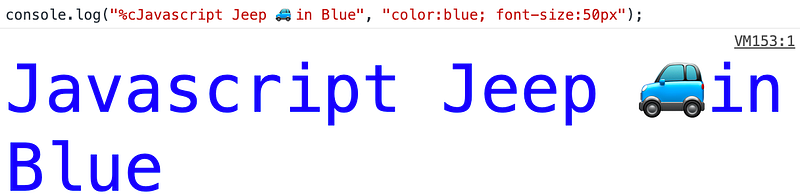
%c → Applies CSS style rules to the output string as specified by the second parameter
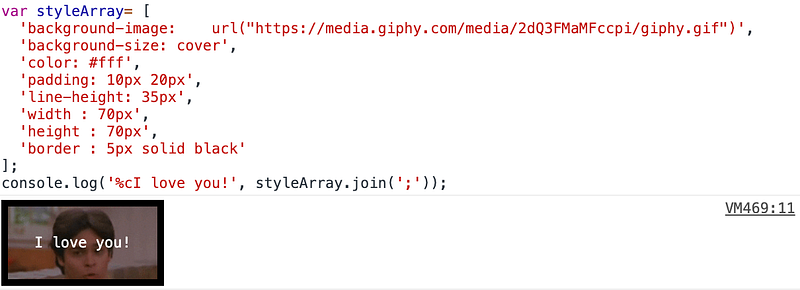
%c → A format specifier that will apply CSS style rules to the output string. We pass the CSS as a string as the second parameter.
console.log('%cI love you!', styleArray.join(';'));
Surprise your customers
var style = 'color: tomato; background:#eee; -webkit-text-stroke: 1px black; font-size:30px;';
console.log('%cHi, We are Happy 😆 to have you as our customer', style );
Creating Facebook stop 🛑 message in the console
If you have opened the console on facebook.com, you have undoubtedly been greet by the “stop” message. Instead of “stop” let’s print a welcome message:
Learn when to use dot and bracket notation in JavaScript.
Dot vs Bracket notation in JavaScript
We can access the property of an object by
Dot notation
Bracket notation
Dot Notation
This is the most popular and most used way of accessing the property of an object. This makes code more readable. Dot notation is used most frequently.
Syntax: obj.property_name
var user = {name : "Mark"};
user.name ; // "Mark"
When not to use dot notation
Consider that we are having a property name as 123
var obj = {
 '123' : 123
};
In the above case if we cannot access using
obj.123;
So, If the property name is not a valid identifier , then we cannot access its value using . notation.
What is an Identifier?
An identifier is a sequence of characters in the code that identifies a variable, function, or property. Generally name of function or variable or property name of Object
What is a valid Identifier?
In JavaScript, identifiers are case-sensitive and
can contain Unicode letters, $, _, and digits (0-9),
but may not start with a digit.
In this case, we can use bracket notation
var obj = {
 '123' : 123
};
obj['123']; // 123
Note
In JavaScript $ , and _ are valid identifiers. so we can access those properties using . notation.
var obj = {
   $ : 10,
   _ : 20
}
obj.$; // 10
obj._; // 20
Bracket Notation
The bracket notation is used when the property name is an invalid identifier(starts with a number, contains symbols).
var obj = {
 test-123 : "test"
}
// in this case we cannot use dot notation
obj['test-123']; // "test"
If the property name is number then we don’t need to wrap the property name inside single /double quotes in object creation. But in bracket notation, if the property name is whole number , then we don’t need to wrap the name inside single /double quotes . But if the property name is double , then need to warp the property name inside single /double quotes .
Example 1: whole number
var obj = {
 123456 : 10
}
obj[123456];
Example 2: Double
var obj = {
 123.456 : 10
}
obj[123.456]; // undefined
obj['123.456']; // 10
Example 3: Using an invalid number
var obj = {
   123.123.123 : 10 // throws invalid number error
}
For this case use single/double quotes
var obj = {
'123.123.123' : 10
}
Example 4: Using special symbols
var obj = {
'123-test' : "test"
}
obj[123-test]; // error(test is not defined)
obj['123-test']; // "test"
Using variable as the property name
Example 1:
var test = "test";
var obj = {
 test : "Test success"
}
obj[test] // "Test success"
Example 2 :
var obj = {
  name : "Mark"
  age : 20
}
var name = "age";
obj["name"]; // Mark
obj[name]; // 20
Example 3: Real-world Example of using bracket notation
function getFood(user) {
let foods ={
      veg :      ["🍏", "🌽", "🍕", "🍅"],
      'non-veg': ["🐓", "🐣", "🥩", "🍖"]
   }
let {foodPreference} = user;
return foods[foodPreference];
}
let user = {name: "Mark", foodPreference : "veg"};
getFood(user); // ["🍏", "🌽", "🍕", "🍅"]
We can also use object as the property name, but that will be converted into [object Object]
var a = {};
var b = {};
var c = {};
c[a] = 10;
c ; {[object Object]: 10}
c[b] = 20; // this will replace old [object Object]
In JavaScript, a variable can store two types of data:
Primitive
Reference
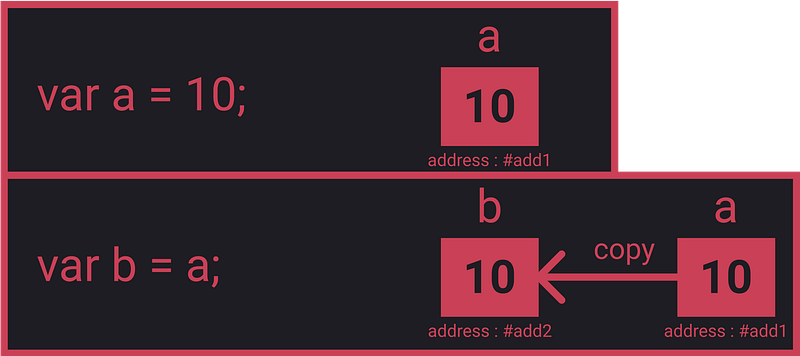
When we copy primitive values, only the value will be copied.
var a = 10;
var b = a;
console.log(a, b); // 10, 10
b = 20;
console.log(a, b); // 10, 20
When we copy primitive values, only values are copied.
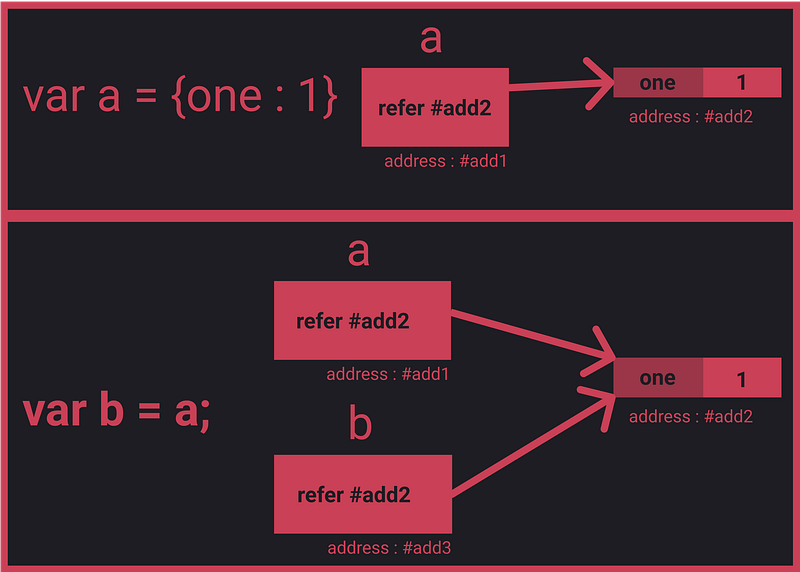
But when we copy reference values, the memory address of the object is shared.
var a = { one : 1};
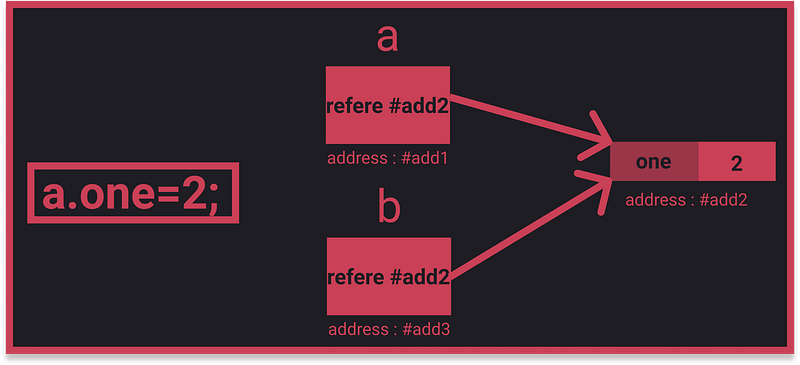
var b = a;
a.one = 2;
console.log(b.one); // 2
b.one = 3;
console.log(a.one); //3
When we assign the object to other variables, only the memory address is copied.
Once we change the property of a or b, we are changing the value at the address of the object.
When the property of the object is changed, the changes are reflected in all variables pointing to the object.
If we want to copy a primitive value, we can use assignment operator (=), but for objects we cannot use the assignment operator.
When copying objects, there are two types:
Shallow copy
Deep copy
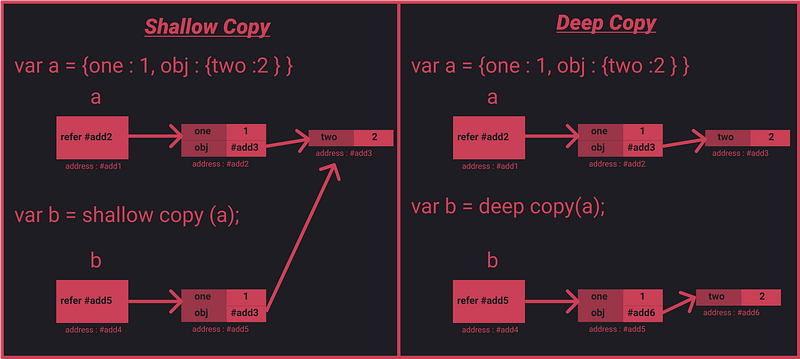
When we shallow-copy a source object to a target object, if the property value of the source object is primitive, then the value is copied to the target object. But if the property value of the source object is reference, then the reference is shared between the source and target objects.
In a deep copy, all the properties (including reference) of the source object are copied as values to the target object. There is no sharing of the reference between the source and target objects.
JSON.stringify and JSON.parse only work with number, string, and object literals and don’t support function or symbol properties.
Also, if the value of the property in the object is Date, then using JSON.stringify will convert the Date object to a string.
var a = { d : new Date() };
var b = JSON.parse(JSON.stringify(a));
b ; // {d: "2019-11-26T00:28:18.775Z"}
What is a circular object?
var a = {};
a.a = a;
Circular objects are objects that have a property value referencing to themselves.
When we perform a deep copy of a circular object, it goes on endlessly. JSON.stringify/parse will throw an exception error when we perform a deep copy on a circular object.
We can use Object.assign to copy a circular object — but avoid creating a circular object in the first place.
Implementing Custom Clone
In the deepClone method, we will loop through all the properties of the object. If the value of the object is primitive, just copy it. If the value is reference, call the deepclone method.
An empty Array is true , because an Array is Object , an object without any properties is always true.
But
[] === true
When we compare empty array ([]) with boolean , When comparing boolean with non-boolean, both the values are converted to number and then comparison will takes place,
Number([]) == Number(true)
0 == 1; // false
Comparing Object
JavaScript, has two different approaches for testing equality. Primitives like strings and numbers are compared by their value, while objects like arrays, dates, and objects are compared by their reference. The reference are considered to be same if both the object points to same memory location.It is same for both triple equals and double equals




















 Js Jeep 🚙