Detecting Focus of a Browser Tab in JavaScript

Determine if a tab has received focus from the user and how to handle events if the focus changes

Image by Sincerely Media

The Page Visibility API gives us the power to determine when a page has focus. The API also triggers visibilitychange event when the focus of the page changes.

The Page Visibility API is super useful when we need to save resources in situations like:

  • Not sending any network requests when the page is not being used by the user.
  • Not executing the animations on a page that is not focused.
  • Not updating any UI on a page that is not focused.
  • Preventing the playback of media if a user is not on the page.

I think Medium also uses this API to determine the reading time of a story.

The Page Visibility API exposes two properties under document object:

document.hidden

Returns a boolean value representing whether the document is hidden or not.

document.visibilityState

A string representation of visibility state:

  • visible → The tab has focus.
  • hidden → The tab is hidden.
  • prerender → The page is loaded in the background but not visited by the user.
  • unloaded → The page is in the process of being unloaded from memory.

The prerender and unloaded states are not supported in all browsers.

In addition to the above properties, we also have an event visibilitychange. This event will be triggered when the browser tab gains or loses focus.

Example

document.addEventListener('visibilitychange', function(ev) {
console.log(`Tab state : ${document.visibilityState}`);
});

In the above example, we simply logged the state. But we can use the event to save resources or execute any desired code when the tab visibility changes.

document.addEventListener('visibilitychange', function(ev) {

// Stop animation
// Stop unwanted request
// Stop unwanted UI update
});

Using the Page Visibility API, matt-west created a video player which pauses the video when the page loses its focus and automatically plays again when the page gains focus.

Thanks for Reading 📖 . I hope you like this. If you found any typos or mistakes, send me a private note 📝 thanks 🙏 😊 .

Follow me JavaScript Jeep🚙💨 .

Please make a donation here. 98% of your donation is donated to someone needs food 🥘. Thanks in advance.


Implementing a Stack in JavaScript

They’re like arrays with more structure and rules

Image by Brooke Lark from Unsplash

Stacks are data structures that follow the Last-In-First-Out (LIFO) principle, meaning the last item inserted into a stack is the first one to be deleted.

In other words, a stack is a list of elements that are accessible only from one end of the list, which is called the Top of Stack (ToS).

A real-world example is a stack of plates. In the above image, we can see that the plate that is inserted last is the first one to be taken off.

Operations that we are going to implement:

  1. Push → Add an element to the stack.
  2. Pop → Delete an element from the stack.
  3. Peek → Get the top element of the stack.
  4. Length → Return the length of the stack.
  5. Search → Search for the element in the stack.
  6. IsEmpty → Check if the stack is empty.
  7. Print → Print the elements of the stack.

Before implementing the stack, let’s create a Stack class.

class Stack {
    constructor(){
this.data = [];
this.top = 0;
}
}

The Stack class has two attributes:

  • data → Is an array in which we store the value.
  • top → Points to the top element index.

push: Insert an Element to the Top of Stack

When we push an element to the stack, we have to store it in the top position of data and need to increment the top variable so that the top will point to the next empty place.

push(element) {
   this.data[this.top] = element;
this.top = this.top + 1;
}

length: Returns the Length of the Stack

To get the length of the stack, we can return the top value.

length() {
   return this.top;
}

peek: Get the Top Element of the Stack

To get the peek element of the stack, we can use the top-1 attribute of Stack class:

peek() {
   return this.data[this.top -1 ];
}

In above code we used top-1 because the top points to the position where the new element is to be inserted, therefore the top empty location.


isEmpty: Checks If the Stack Is Empty

If the value of the top is equal to 0 then there is no element in the Stack.

isEmpty() {
  return this.top === 0;
}

pop: Deletes an Element at the Top of the Stack

When we pop an element from the stack, we have to remove the element in the top position of data and need to decrement the top variable so that the top will point to the previous element’s position.

pop() {
     this.top = this.top -1;
return this.data.pop(); // removes the last element
}

In addition to the above code, we need to ensure that the stack is not empty, otherwise the value of the top will be decremented below zero. So, the above code will be like this:

pop() {
    if( this.isEmpty() === false ) {
       this.top = this.top -1;
return this.data.pop(); // removes the last element
     }
}

print: Print the Elements of the Stack

function print() {
  var top = this.top - 1; // because top points to index where new    element to be inserted
  while(top >= 0) { // print upto 0th index
console.log(this.data[top]);
top--;
}
}

Reverse the Stack

To print the stack in reverse order, we can use recursion.

function reverse() {
this._reverse(this.top - 1 );
}
function _reverse(index) {
   if(index != 0) {
this._reverse(index-1);
}
console.log(this.data[index]);
}

Let’s combine all the code together.

https://gist.github.com/Jagathishrex/5f6b9c9b3e3aa04ddd1ba0e4e2996f0e#file-stack-js

Thanks for reading. I hope you like this.

Six Ways to Create Objects in JavaScript

Learn six different ways to create an object in JavaScript.

image by Dawid Zawiła

There are multiple ways to create Object in Javascript, I have listed six of them which I learned while reading. So I would like to share that with all JavaScript geeks here.

First Way → Using Assignment

This is how most of us create objects in JavaScript,

var user = {
   name : "Tony",
   age : 50
}

Second Way → Using new operator on function.

function User(name, age) {
  this.name = name
this.age = age;
   this.print = function() {
console.log(`Hi , I am ${this.}`);
};
}

// Create Object
var tony = new User('Tony', 50);
tony.print(); // Hi, I am Tony
// we can also add new properties to tony object
tony.wife = "Pepper pots";

Third Way → Using Object constructor

// Create Object
var user = new Object();
user.name = "Tony";
user.age = 50;

Fourth way → Passing object to Object Constructor

var user = {
name : "Tony",
age : 50
};
var tony = new Object(user);
// Be careful that if we change property of tony it get affected in user object
tony.age = 51;
user.age; // 51

Fifth Way → Using Object create method

var user = {
name : "Tony",
age : 50
};
var tony = Object.create(user);
tony.age; //50
// we can change value , but it is not reflected in source , only if the value is not object
tony.age = 51;
user.age; // 50

Sixth Way → Using ES6 class Syntax

class User  {
  constructor(name, age) {
this.name = name;
this.age = age;
}

sayHi() {
console.log(`Hi 👋 from ${this.name}`);
}
}
var tony = new User("tony", 50);
tony.sayHi(); // Hi 👋 from tony

Thanks for Reading 📖 . Hope you like this. If you found any typo or mistake send me a private note 📝 thanks 🙏 😊 .

Follow me JavaScript Jeep🚙💨 .

Please make a donation here. 98% of your donation is donated to someone needs food 🥘. Thanks in advance.

Implementing a Queue in JavaScript

A look at the queue data structure

Image by Levi Jones on UnSplash

A queue is a list — similar to the real world queue. The one who gets into the queue first is the one who is removed first from the queue.

Technically speaking, this process is called first in, first out (FIFO). The element which is inserted first will be removed first from the list

Elements are always added to the end of the list and removed from the front of the list.

Different operations in Queue are:

  • Enqueue → Add an element to the queue
  • Dequeue → Remove an element from the queue

Operations we are going to implement:

  • Inserting an element at the end of the queue
  • Deleting an element in the front from the queue
  • Get the front element
  • Get the Last element
  • Check if a queue is empty
  • Print the elements of the queue
  • Print the length of the queue

Let’s create a Queue class.

class Queue {

constructor(){

this.data = [];
this.rear = 0;
this.size = 10;
   }
}

data → is the list in which we store our elements

rear → is used to store the position in which the next element will be stored

size → maximum number of elements a queue can have


Enqueue: Inserting an Element at the End of the Queue

After inserting an element to the queue, we need to increase the rear value by 1 so the rear points to the next position where the new element will be inserted.

enqueue(element) {
     this.data[this.rear] = element;
this.rear = this.rear + 1;
}

In addition to the above case, we need to check if the queue is full or not so it avoids overflow.

enqueue(element) {

if(this.rear < this.size ) {
          this.data[this.rear] = element;
this.rear = this.rear + 1;
}
}

Length: Returns the Length of the Queue

To get the length of the queue, we can use the rear attribute.

 length() {

return this.rear;
 } 

IsEmpty: Check If the Queue Is Empty

If the rear points to 0 , then we can say that the queue is empty. Because the rear points to the position where the new element will be placed, if the rear points to 0, there’s no element in the queue

isEmpty() {

return this.rear === 0;
}

GetFront: Get the Front Element of the Queue

In addition to getting the front element, this will check if the queue is empty or not.

getFront() {

if(this.isEmpty() === false) {
        return this.data[0];
    }
}

GetLast: Get the Last Element Added to the Queue

We know the rear value points the new position, where the next element will be inserted into the queue. So to get the last element in the queue, we can decrease the rear index by 1.

getLast() {

if(this.isEmpty() === false) {

return this.data[ this.rear - 1 ] ;
}
}

Delete: Deleting the Front Element From the Queue

The element which is inserted first is the one that is deleted first. So we can delete the front element and decrease the rear value by 1 so the rear points to the next position to insert correctly.

dequeue() {

if(this.isEmpty() === false) {

this.rear = this.rear-1;
return this.data.shift();
}
}

Print Elements of the Queue

We can print the elements of the queue from the0 index to the rear-1 index of the queue.

print() {

for(let i =0; i < this.rear; i++) {
console.log(this.data[i]);
}
}

Reset Queue

Delete all elements of the queue and set the rear to 0.

clear() {
this.data.length = 0;
this.rear = 0;
}

The End

Let’s combine all the above code together

https://gist.github.com/Jagathishrex/d6c9b4688b9f996ca0c49a90ead09f08#file-queue-js

Thanks for reading. I hope you enjoyed the article.

Different ways to remove elements from an array in JavaScript

Image by Michael Dziedzic From UnSplash

1. Using the pop method

Array.pop will delete the last element of an array.

var array = [1,2,3,4,5];
array.pop();
array; // [1,2,3,4]
array.pop(); 
array; // [1,2,3]

2. Using the shift method

Array.shift will delete the first element of an array.

var array = [1,2,3,4,5];
array.shift();
array; // [2,3,4,5]
array.shift();
array; // [3,4,5]

3. Using the delete operator

The delete operator only erases the value of the element and makes the element as undefined. The length of the array stays unaffected.

var array = [1,2,3,4,5];
delete array[0];
delete array[2];
array.length ; // 5

4. Using the splice method

If we want to delete an element and change the length of the array, then we can use splice method. This method will remove n number of elements from the specific index.

MDN: The splice() method changes the contents of an array by removing or replacing existing elements and/or adding new elements in place (In the original array).

array.splice(index , deleteCount, item1, item2, ...)
  • index → index from which the slice operation should start.
  • deleteCount → number of elements to be deleted from the index.
  • item → elements to be inserted
var array =[1,2,3,4,5];
array.splice(2,1);
array; //[1,2,4,5]
array.splice(0,1) 
array; // [2,4,5]

5. Using the filter method

We can also use the filter method on an Array to remove an element in specific index of the array. But when we use filter, it creates a new array.

var array = [1,2,3,4,5];
var indexToDelete = 1;
let newArray = array.filter( (item, index) => {
if(index !== indexToDelete){
return item;
}
});
newArray; // [1,3,4,5]

6. Resetting an array

If we want to delete all elements of the array, then we can simply do it like this:

var array = [1,2,3,4,5]
array.length = 0;
or 
array = [];

Thanks for Reading 📖. I hope you enjoyed the article. If you found any typos or mistakes, send me a private note 📝 Thanks 🙏 😊 .

Follow me JavaScript Jeep🚙💨 .

Please make a donation here. 98% of your donation is donated to someone needs food 🥘. Thanks in advance.

https://levelup.gitconnected.com/detecting-online-offline-in-javascript-1963c4fb81e1

Using the every() and some() methods of Array in JavaScript

Learn how to use every and some method in JavaScript.


  • every → Checks if all elements of the array satisfies the provided callback function
  • some → Checks if any one of element in the array satisfies the provided callback function

every

The every method will take a testing function as an argument, all the element of the array is tested against the testing function .

If the testing function returns truthy value(any truthy value) for all elements of the array , then the every method returns true.

If the testing function returns false for any one of the element then the every method returns false and remaining elements are not tested .

For empty array the test method returns true.

function isEven(item, index, sourceArray) {
   return (item % 2 === 0); 
}  
var array = [0,2,4,6];  
array.every(isEven); // true

The above example can be simplified using arrow function

var array = [0,2,4,6]; 

array.every( item => (item % 2 === 0) ); // true

We can also add and delete elements of the source array

  • If we add elements to the source array, then the test function is not tested for the added element

https://gist.github.com/Jagathishrex/bda92c2e6d1c49a143c97374e54d6418#file-some1-js

  • If we remove elements of the source array , then the deleted elements are not tested

https://gist.github.com/Jagathishrex/f9da3343ef045c90ad35b9d5975df843#file-some_ex3-js

If an existing, unvisited element of the array is changed by callback , then the value of the element while visiting test function will be the modified value of the element.

Things to notice

Note 1: The below method will return false because "" is a falsy value.

var array = [1]; 
array.every( item=> "" ); // false

Note 2: The below method will return true because non-empty stringis a truthy value.

var array = [1]; 
array.every( item=> "I am truthy value" ); // true

Note 3 :It we test every method against an empty array then it returns true

[].every(item => item); // true

Note 4: If we want to check if all elements on the array is true , then we can check like

var array = [1,"test", function(){}, "true"];  
array.every(item=> item); //true
array.push(0);  
array.every(item=> item); // false

some

The some method test each element of the array by passing it to callback function(testing function) .

If any of the element returns truthy value then the some function will return true and the remaining elements are not tested.

If no element in the array returns true, then some method will return false.

This method returns false for empty array.

var array = [false, 0 , 1];  
array.some(item => item); // true

Check if an value present in array using some

function isPresent( arr, itemToFind ) {
  return arr.some( item => item === itemToFind );
}
const fruits = ['🍏 ', '🍌 ', '🥭 ', '🍉 '];
isPresent(fruits, '🍏 '); // true
isPresent(fruits, '🍓'); // false

Elements that are deleted are not tested .

https://gist.github.com/Jagathishrex/98b6856d4a162bd06fa966b60827a91f#file-every_4-js

Elements added to the array after the call to some() begins, will not be tested by callback.

https://gist.github.com/Jagathishrex/d1e20c46fbd92d8ee3f59c293face8f8#file-every_5-js

If an existing, unvisited element of the array is changed by callback , then the value of the element while visiting test function will be the modified value of the element.

https://gist.github.com/Jagathishrex/f221144206d2ee8a05852b59d64da094#file-every_6-js

Note 1: The some method returns false for empty array

var arr = [] ;
arr.some();

Don’t Forget to pass callback function

For both some and every method will throw exception if we forgot to pass callback function to test

Breaking the some and every method

If you want to break a some method then we can return true inside the some ,method, If you want to break a every method then return false inside the every method.


Thanks for Reading 📖. I hope you enjoyed the article. If you found any typos or mistakes, send me a private note 📝 Thanks 🙏 😊 .

Follow me JavaScript Jeep🚙💨 .

Please make a donation here. 98% of your donation is donated to someone needs food 🥘. Thanks in advance.

https://levelup.gitconnected.com/creating-a-pdf-viewer-in-javascript-9b988b5ec163

In-Depth Introduction to Call Stack in JavaScript.

Learn how the function executed in JavaScript.

Image from Eaters Collective

What is Stack ?


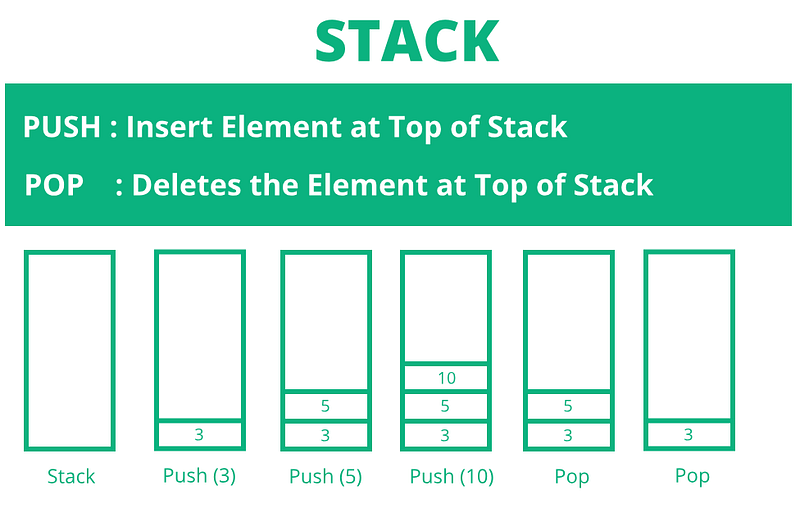
Stack is a Data structure, which is similar to an array, except that we cannot access the elements using the index directly and we can only insert and delete elements at the Top of Stack(ToS).

We majorly perform 2 operations in stack

  • Push → Inserting an Element
  • Pop → Deleting an Element

Stack follows LIFO (Last In First Out) , means

  • If stack encounter push operation then the element is inserted at the Top of the Stack(ToS),
  • If stack encounters pop operation the element at the Top of the Stack(ToS) is removed first.

In programming, the stack(call stack) is used to store the order of function call. So that we can store the latest function call at the top, once the function is executed, the last executed function can be removed from the stack.

JavaScript is Single thread , meaning JavaScript can handle(executes) only one function at a time, So for this case, only one stack is enough to handle.

Single Thread → One Stack → One function execution at a time

EVENT LOOP

The event loop is one which, checks if there is any function call in the call stack, and takes the function call and executes it.

function one() {
var a = 10;
return a;
}

How the function will be executed internally

Let’s create a function,

function one() {
var a = 10;
return a;
}

When we call the function one ,

  • one is pushed to the call stack ,
  • Then it executes line var a = 10; which is a variable creation so memory for a is created in heap (this is where memory for variables, objects, and functions are allocated )
  • Then the next line is executed return a , this will return the value of a .
  • Once the function is finished executing, then it is removed from the call stack.

call stack for function one

Now let’s look into another Example

function one(){
two();
}
function two() {
three();
}
function three() {
console.trace(“Call Stack”);
}
one();

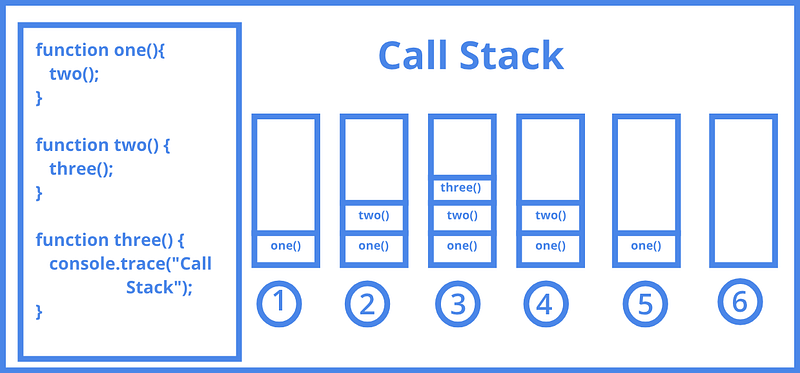
call stack
  1. When the function call for one() is made, it is pushed to the call stack.
  2. Inside the one function another function call to two() is made. So now the two is pushed to the call stack, and the control is transferred to function two.
  3. Inside two another function call to three() is made. So three is pushed to the call stack, and the control is transferred to function three.
  4. The console.trace in function three will print the call stack, then there is no more statement to execute in function three , so, it will be removed from the call stack and the control go back to function two.
  5. In the function two , there is no more statement to execute, so two is removed from the call stack and the control transferred to the function one .
  6. In the function one there is no more statement to execute, now it also removed from the stack.

How many function call can be pushed to Stack.

The Stack is a data structure there will some certain amount of memory allocated to the call stack, So there is only a certain number of calls that can be pushed to the call stack. If the call stack is full then it will throw Maximum call stack size exceeded(StackOverflow) exception.

Learn about exceptions here.

To get Maximum call stack size exceeded, we can

Maximum call stack size exceeded
var i =0;
function test() {
console.log(i++);
test();
}

This will print the maximum number of calls we can push to the call stack of JavaScript.

Now let’s understand Async Function Execution.

Up to this, we learned that only one thing can be executed by JavaScript at a time, but not for async call.


Consider that we need to download a large image.

If JavaScript executes the downloadImage function and what if the internet is slow, then it blocks the page, everything will be frozen.

But JavaScript will handle this in another way using an asynchronous function.

An asynchronous function is a function which operates asynchronously via the event loop, using an implicit Promise to return its result.

In simple words, An asynchronous function is a function with two things, request and callback. callback function which will be executed once the response for the request is received.

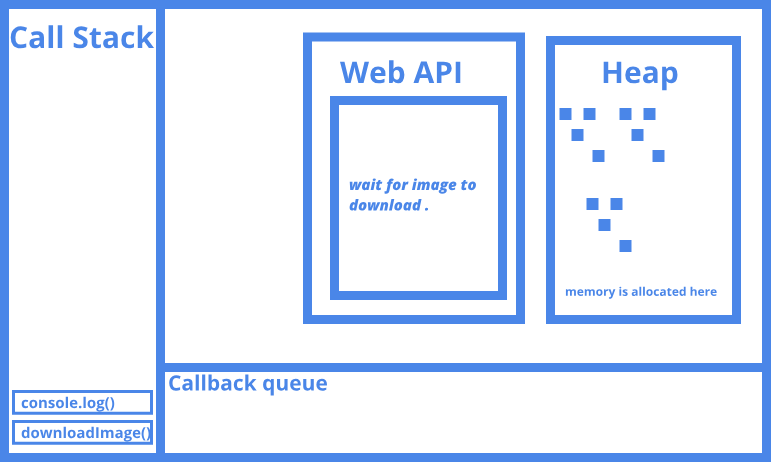
Once the asynchronous function is called it is pushed to the call stack and the call back is pushed to WEB API’s(provided by Browser) this will handle the success of request, and then the remaining part of the asynchronous is executed, then the function call is removed from the call stack.

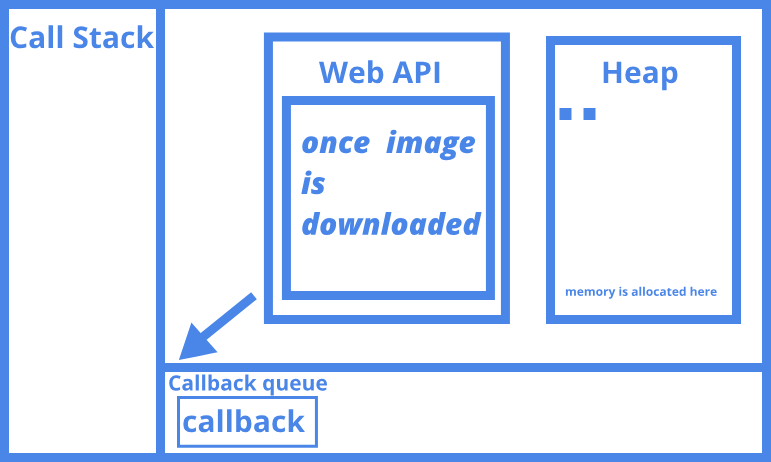
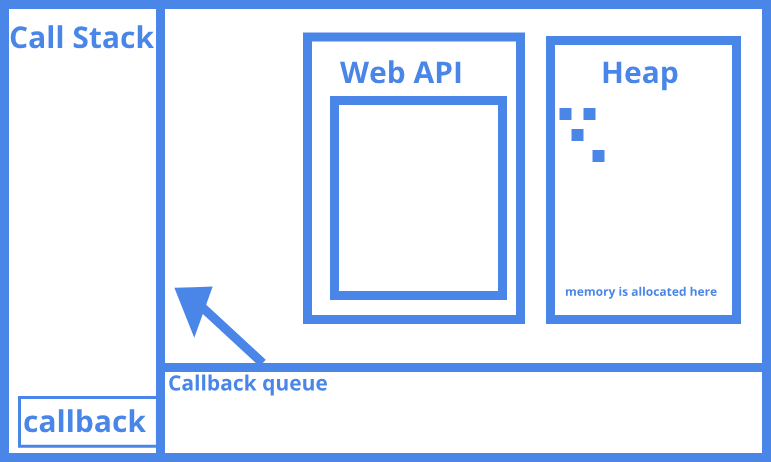
Once the WEB API receives the success for a request then it will push the corresponding callback to the callback queue (this is where callback are pushed, in that order the callback will be pushed to call stack). When event loop finds that the call stack is free, the callback from the message queue will be pushed to the call stack and the callback will be executed as a normal function execution.

Call stack for Asynchronous function

When it finds fetch call inside the downloadImage function , it sends the request , then executes the next line of the function.


Once the image is downloaded the callback is pushed to callback/message queue


If there is no current function is executing(if the call stack is empty), then it is pushed to call stack and executes the callback


The above case works similarly in setTimeOut also.

Visual representation of the event loop can be found here.

References :

Flaviocopes, MDN, What the heck is the event loop anyway? .

Thanks for Reading 📖 . I hope you like this. If you found any typo or mistake send me a private note 📝 thanks 🙏 😊 .

Follow me JavaScript Jeep🚙💨 .

Removing jQuery From Your Project With JavaScript: Part 1

Learn to replace the jQuery DOM operation with JavaScript

Photo by Sagar Patil on Unsplash

The reasons for removing jQuery are:

  • To get native performance
  • To understand what’s happening inside jQuery functions so we can decide whether we go for jQuery or JavaScript

Part 1 of this series only focuses on getting elements without using jQuery. I’ve added alternative JavaScript methods for more frequently used jQuery functions.


1 . Selecting an Element Using Selector

// jQuery
$('selector');

// JavaScript
document.querySelectorAll('selector'); //returns NodeList

If we want to get the first element — which matches the selector — then use:

document.querySelector('selector');

2. Get Elements By Class Names

To get an element by its class name, we can use getElementsByClassName or querySelector with a prefixed .

// jQuery
$('.className');

// JavaScript
document.querySelectorAll('.className');

// or
document.getElementsByClassName('className');

3. Get Element by ID

To get an element by its ID, we can use getElementById or querySelector with a prefixed #.

// jQuery
$('#id');

// JavaScript
document.querySelector('#id');

// or
document.getElementById('id');
//or
window['id']

4. Get Elements by TagName

To get an element by its tag name, we can either use getElementsByTagName, or we can use the querySelectorAll function.

//jQuery
$('tagName'); // Example : $('li');
//JavaScript 
document.getElementsByTagName('tagName');
// To get elements from another element using tag name 
parentElement.querySelectorAll('li');

5. Get Elements by Attribute

// jQuery
$('a[target=_blank]');

// JavaScript
document.querySelectorAll('a[target=_blank]');

6. To Get the Previous Element

Use previousElementSibling to get the previous element.

// jQuery
$el.prev();

// JavaScript
el.previousElementSibling;

7. To Get the Next Element

Use nextElementSibling to get the next element.

// jQuery
$el.next();

// JavaScript
el.nextElementSibling;

8. To Get All Siblings

To get all siblings:

  • Get parent
  • Get children of parent
  • Create a siblings array
  • Push children to siblings, if the children are not equal to the current element
  • Return siblings
function getSiblings(el) {
let parentNode = el.parentNode,
children = parentNode.children,
totalChildren = children.length,
siblings = [];
  for(let i = 0; i < totalChildren; i++) {
let currentChild = children[i];
if(el != currentChild) {
siblings.push(currentChild);
}
}

return siblings;
}

The above code can also be written like:

Array.from( el.parentNode.children ).filter((child) =>
child !== el
);

9. Get All Previous Siblings

We can use previousElementSibling to get the previous element of the current element. Then we can loop until the first element.

// jQuery
$el.prevAll();

// JavaScript
function getPreviousSiblings(elem) {
var siblings = [];
  while ( elem = elem.previousSibling ) {     
if ( elem.nodeType === 3) { // ignore texts
continue;
}
siblings.push(elem);
}
   return siblings;
}

10. Get All of the Next Siblings

We can use nextElementSibling to get the next element of the current element. Then we can loop until the last element.

// jQuery
$el.prevAll();

// JavaScript
function getNextSiblings(elem) {
var siblings = [];
   while ( elem = elem.nextElementSibling ) {     
if ( elem.nodeType === 3) { // ignore texts
continue;
}
siblings.push(elem);
}
   return siblings;
}

11. Find the Closest Element That Matches the Selector

el.matches checks if the element is the selector.

// jQuery
$el.closest(selector);

// Native - Only latest, NO IE
el.closest(selector);

// Native - IE10+
function closest(el, selector) {
const matchesSelector = el.matches ||
el.webkitMatchesSelector ||
el.mozMatchesSelector ||
el.msMatchesSelector;

while (el) {
if (matchesSelector.call(el, selector) ) {
return el;
} else {
el = el.parentElement;
}
}
return null;
}

12. To Get the Parent of the Element

To get the parent of the current element, we can use the parentElement attribute on the currentElement.

// jQuery
$(el).parent();
//JavaScript
el.parentElement

13. To Get Children of the Element

To get children of the current element, we can use the children attribute on the currentElement.

//jQuery
$(el).children();
//JavaScript
el.children

14. To Get the Body

To get the body element, we can use:

// jQuery
$('body');

// JavaScript
document.body;

15. IFrame document

To get the document of the IFrame:

// jQuery
$iframe.contents();

// Native
iframe.contentDocument;

Thanks for reading. Hope you like this.

Creating a PDF Viewer in JavaScript

Learn how to create a PDF viewer in Javascript using PDF.js

PDF.js is a JavaScript library maintained by Mozilla and designed for handling PDFs in JavaScript.

Implementing PDF js

We are going to create a PDF viewer which will have the following functionality:

  1. View a PDF
  2. Go to the next page
  3. Go to the previous page
  4. Go to a particular page number

First download PDF.js files from here.

HTML File for Rendering the PDF

Create a new index.html file, and in that create:

  • canvas → Where the pdf will be rendered.
  • previous button → To go to the previous page.
  • next button → To go to the next page.
  • input box → To enter a page number.
  • Go to page button → Button to go to a particular page.
  • 2 span elements → Display the current page number and total pages of the PDF

https://gist.github.com/Jagathishrex/374736c44b1fd614fcfe18c76ea71cb5#file-index-html

Initializing the JavaScript File for Rendering the PDF

In addition to the index.html file, create a script.js file where we write our JavaScript code to create a PDF viewer.

First initialize the variables:

https://gist.github.com/Jagathishrex/e3fe818fc3106410ba1c729ad4d0d4a5#file-init-js

Now add event listeners to handle the PDF renderer once the page loads:

https://gist.github.com/Jagathishrex/15d1ed501bbc9793f817dc83b0702e83#file-evets-js

initPDFRenderer Function

  • We need to initialize the PDF.js with a source PDF
  • We can use the getDocument method to get a promise which resolves to pdfData
  • The PDF data has a function getPage
  • The getPage will return a promise
  • Once the promise is resolved we get the page data
  • We can then use the render method in the page data to render it in the canvas

https://gist.github.com/Jagathishrex/eb8954c0d83d5c3fbfdd016c710171b5#file-initpdfrenderer-js

Now when we call initPdfRenderer, this will assign the pdfData to the pdf variable.

Add events for pagination buttons

Add events for previousButton, nextButton, and goToPage buttons.

https://gist.github.com/Jagathishrex/c5947554bea02b27a4226df5682054a8#file-initbtnevents-js

renderPage function

Now let’s create a renderPage function to render the PDF page to the canvas:

https://gist.github.com/Jagathishrex/ade1780cb31bd3bea55827c5d3722f28#file-renderpage-js

We have a method to get pdfData and render page. Let’s write our pageRenderingQueue.

If the user clicks next page/previous page it will add/subtract 1 to the currentPageNum and pass it to the renderPageQueue method. This will check if the pageRenderingQueue is null. If it is null, then we call the renderPage method, else assign the page number which is to be rendered to the queue. Once the page rendering is complete, it will check if the pageQueue is empty and perform the respective action if needed.

https://gist.github.com/Jagathishrex/b8a3f0f293451464d1d1e7c1e272b6c5#file-renderqueue-js

Let’s create a renderNextPage and renderPreviousPage method. 
If the user clicks “next page”, do currentPageNum + 1 and call renderPage. Similarly, for “previous page” do currentPageNum — 1 and call renderPage. We also need to check if the currentPageNum is the first or last page.

https://gist.github.com/Jagathishrex/f4e3859b8fb360c444d3ca11f57e1269#file-nexandprevpage-js

Now let’s implement the “go to page number” function.

Get the page number from the input box, then check if the number is a valid number and call the renderPage method.

https://gist.github.com/Jagathishrex/8d85e419af007dbb05f91c52458286f9#file-gotopage-js

So the final code is:

https://gist.github.com/Jagathishrex/08fa099b4b01b04c30ecc6d203f7f05e

Thanks for Reading 📖. I hope you enjoyed the article. If you found any typos or mistakes, send me a private note 📝 Thanks 🙏 😊 .

Follow me JavaScript Jeep🚙💨 .

Please make a donation here. 98% of your donation is donated to someone needs food 🥘. Thanks in advance.

Implementing Set functionality in JavaScript

Learn how to implement union ,intersection , difference , symmetricDifference in JavaScript.

Image from Javier Quesada

The Set object lets you store unique values of any type, whether primitive values or object references.

Example

var array = [1,2,3,4,4,5];
var set = new Set(array);
set; // Set(5) {1, 2, 3, 4, 5} duplicates are removed

The detailed introduction to Set is provided here.

Set operations that we are going to implement

  • Union → returns a new Set which has all the elements from both set.
  • Intersection→ returns a new Set which has common elements in both set.
  • Difference → Set A — Set B will return elements from Set A which are not in Set B .
  • Symmetric Difference → Returns a new set , which is created from elements of Set A , which are not present in Set B and elements of Set B which are not present in Set A .

1. Union

The union method returns all elements from SetA and SetB ,

function union(setA, setB) {
    return new Set([...setA, ...setB]);
}
var setA = new Set([1,2,3,4,5]);
var setB = new Set([3,4,5,6]);
union(setA, setB); Set(6) {1, 2, 3, 4, 5, 6}

2. Intersection

The Intersection operation returns a new Set which has common elements in both set. We can find that by

  • Loop through setA
  • If element of setA present in setB , push to a new set

We can check if a Set has an element using has method in Set object.

function intersect(setA, setB) {
var commonElements = new Set();

for (var elem of setB) {
        if (setA.has(elem)) {
commonElements.add(elem);
}
   }

return
commonElements;
}
var setA = new Set([1,2,3,4,5]);
var setB = new Set([3,4,5,6]);
intersect(setA, setB); // Set(3) {3, 4, 5}

3 . Difference

Set A — Set B will return elements from Set A which are not in Set B , if we perform Set B — Set A then the function will return elements from Set B which are not present in Set A . We can achieve this by

  • Loop through Set B and delete all elements of Set B in Set A using delete method in Set object
function difference(setA, setB) {
    var diff = new Set(setA);
    for (var elem of setB) {
        diff.delete(elem);
    }
    return diff;
}
var setA = new Set([1,2,3,4,5]);
var setB = new Set([3,4,5,6]);
// SET A - SET B
difference(setA, setB); // Set(3) {1,2}
// SET B- SET A
difference(setB, setA); // Set(3) {6}

4. Symmetric Difference

This method returns a new set , which is created from elements of Set A , which are not present in Set B and elements of Set B which are not present in Set A . We can achieve this by

  • Create a new set Result Set from Set A

For each Element of Set B

  • If the element of Set B present in Result Set then remove it .
  • If the element is not present then add to the Result Set
function symmetricDifference(setA, setB) {
    var resultSet = new Set(setA);
    for (var elem of setB) {
        if (resultSet.has(elem)) {
           resultSet.delete(elem);
} else {
           resultSet.add(elem);
}
}
return resultSet;
}
var setA = new Set([1,2,3,4,5]);
var setB = new Set([3,4,5,6]);
symmetricDifference(setA, setB); // Set(3) {1, 2, 6}

5. isSuperSet

This is a util function which will check of all elements on subset present in Set . We can achieve this by

For each element of subset

  • if any element is not present in set return false.
function isSuperset(set, subset) {
    for (var elem of subset) {
        if (!set.has(elem)) {
return false;
}
    }
    return true;
}
var set = new Set([1,2,3,4]);
var subset = new Set([3,4]);
isSuperset(set, subset); // true
subset = new Set([3,4,6]);
isSuperset(set, subset); // false

Thanks for Reading 📖 . Hope you like this. If you found any typo or mistake send me a private note 📝 thanks 🙏 😊 .

Follow me JavaScript Jeep🚙💨 .

Please make a donation here. 80% of your donation is donated to someone needs food 🥘. Thanks in advance.
Design a site like this with WordPress.com
Get started