Everything you need to know about error handling in Javascript

Exception handling is the way that we can prevent abnormal program termination on runtime due to some Exception. For example

In the above case, instead of termination of the program, we can handle it by try…catch block.

  • Any error inside try block doesn’t cause program termination.
  • If an error is caused inside the try block then the execution control is transferred to catch block.
  • In simple words, try checks for any error, and catch receives execution control when an error occurs and can handle it. Afterwards, the program is resumed as normal.
  • If no error occurs, then the catch block is skipped.

Example :

In the above example, If we don’t pass the name then it results in an exception, and then the exception is handled in the catch block.

When we call the function checkName()without passingname:

  • An exception occurs when calculating the length.
  • When an exception has occurred, the remaining code below the current line in the try block is not executed.
  • When an exception occurs, the catch block receives an error object, which contains the details of the error.

try…catch…finally

The finally blocks is always executed even when there is no error inside the try block.

We can also use try…finally instead of try..catch like:

Example

Custom Errors

A custom error means throwing our own error.

The throw operator generates a custom error. For that we need to create an error object, then we can throw that ErrorObject.

Read about all available Errors in Javascript here on MDN.

Creating a custom exception class for throwing a custom exception:

Re-throwing an error

We can also re-throw the error which is caught in a catch block.

Consider that,

  • We have use a try…catch block to catch the TypeError
  • But there is another error that has occurred inside the type block which programmer is unaware.
  • To handle this situation we can re-throw the error which is not expected in catch block

ES10 Modification on Error Handling with Optional Catch Binding

Optional catch binding allows developers to use try/catch without the error parameter inside the catch block.

Some interesting things in try…catch

  1. Whatever variable you declare inside the try or catch block cannot be accessed outside.

2. The try..catchworks synchronously,

If an exception in setTimeout, then try..catch won’t work.

The above code can be transferred to

Introduce Yourself (Example Post)

This is an example post, originally published as part of Blogging University. Enroll in one of our ten programs, and start your blog right.

You’re going to publish a post today. Don’t worry about how your blog looks. Don’t worry if you haven’t given it a name yet, or you’re feeling overwhelmed. Just click the β€œNew Post” button, and tell us why you’re here.

Why do this?

  • Because it gives new readers context. What are you about? Why should they read your blog?
  • Because it will help you focus you own ideas about your blog and what you’d like to do with it.

The post can be short or long, a personal intro to your life or a bloggy mission statement, a manifesto for the future or a simple outline of your the types of things you hope to publish.

To help you get started, here are a few questions:

  • Why are you blogging publicly, rather than keeping a personal journal?
  • What topics do you think you’ll write about?
  • Who would you love to connect with via your blog?
  • If you blog successfully throughout the next year, what would you hope to have accomplished?

You’re not locked into any of this; one of the wonderful things about blogs is how they constantly evolve as we learn, grow, and interact with one another β€” but it’s good to know where and why you started, and articulating your goals may just give you a few other post ideas.

Can’t think how to get started? Just write the first thing that pops into your head. Anne Lamott, author of a book on writing we love, says that you need to give yourself permission to write a β€œcrappy first draft”. Anne makes a great point β€” just start writing, and worry about editing it later.

When you’re ready to publish, give your post three to five tags that describe your blog’s focus β€” writing, photography, fiction, parenting, food, cars, movies, sports, whatever. These tags will help others who care about your topics find you in the Reader. Make sure one of the tags is β€œzerotohero,” so other new bloggers can find you, too.

A short introduction to CSS variables


Using CSS variables we can set a value to a property and reuse it in our CSS code. This can be thought of almost exactly how we use variables in JavaScript.

When do we need CSS variables?

When we are working on a project, and we need to use the same value (text color, background, border, etc) for many elements. In this case, instead of rewriting the same code, we can set to the CSS variable then we can access it. For example, if you have a color palette or standardized spacing, you can store these directly in CSS to reuse them.

CSS variables go by other names such as β€œcustom properties” or β€œcascading variables”.

The value for the property name starts with two dashes prefixed --property-name: value.

--border: 2px solid #fafafa;

The value of the property is assessed using var()

div {
border: var(--border);
}

Whenever we need to set the property we need to define the scope for the property.

link forΒ code

Now consider the situation when we need to set the text color of text inside div as red and the color of text inside the span should be blue. For this case, we need to define color property in two scopes (the div and span).

link forΒ code

So the result will be


If you need a property that is common in all scopes/elements, then you can define the property inside theΒ :root.


Now consider the code:

link forΒ code

In the above code, we have not given the text color property for the div with the classΒ .four, but the color of the text is red. This is because the value for the property is inherited by default. So if there is no specific value for the current div then the property is inherited from the parent, just as with normal CSS!

Fallback values

.two{
   color: var(--color, brown);
}

We didn’t define any value for the --color variable in this case, so we can provide a default value that it will fall back to.

In the above case what we have done is to tell the browser to use the brown color if the browser isn’t able to find the variable --color.

We can also use it as the following:

.two{
      color : var(--color, var(--textcolor, brown));
}

In the above code if browser can’t find --color then it searches for --textcolor, and if it can’t find --textcolor then it will use the brown color.

Handling invalidΒ values

Consider that

.four {
  --size : 16px;
}
.four {
    color : var(--size);
}

The --size property cannot be applicable to color property. In this case, the browser will attempt the following:

  • First try to inherit property from the parent
  • If the element doesn’t have a parent, then the default value is applied (in our case black color is applied)

Using CSS variables in Javascript

To get the value of CSS variable:

let element = document.querySelector('.two');
getComputedStyle(element).getPropertyValue('--textcolor')

To access inline style you need to do like:

element.style.getPropertyValue("--textcolor");

To set variable on an inline style:

element.style.setProperty("--textcolor", yellow );

If you find this helpful surprise 🎁 me here.

Share if you feel happy πŸ˜ƒ πŸ˜† πŸ™‚Β .

Follow Javascript JeepπŸš™ if you feelΒ worthy.


https://gitconnected.com/learn/javascript

Converting a string to camelCase in Javascript

Learn how to convert a string into camelCase in Javascript.

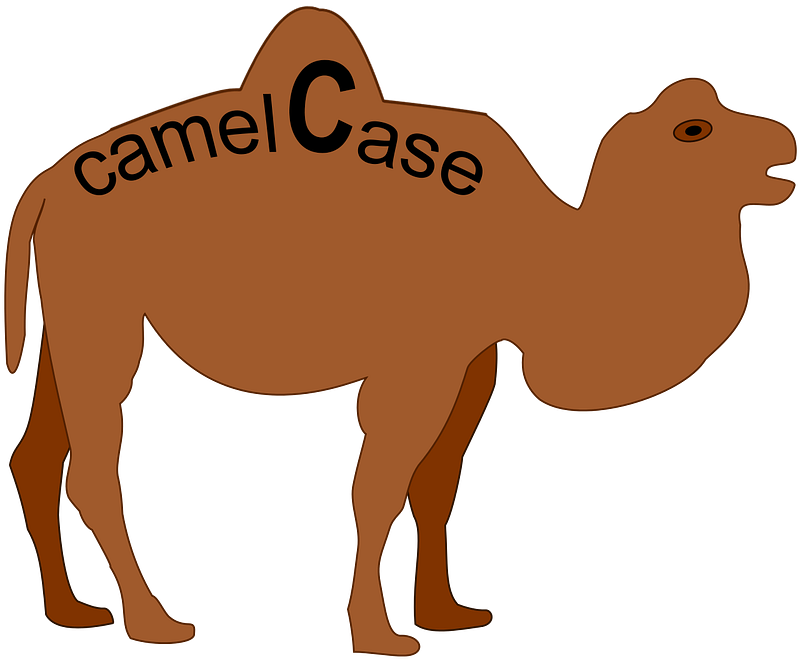
image from wikipedia

camelCase:

Camel case (stylized as camelCase; also known as camel caps or more 
formally as medial capitals) is the practice of writing phrases such 
that each word or abbreviation in the middle of the phrase begins 
with a capital letter, with no intervening spaces or punctuation.
Example: eBay, iPhone
The above details is taken from wikipedia. 

Steps to convert a string to πŸͺ case

  • Convert the input to string type
  • Split the string into words. The splitting is not only based on space. We use regex to parse a string which will remove all special characters and split a string into two parts if a string has two capital letters and split the number part separate.
  • Convert the first string to lowercase and capitalize the other string. Then join the strings.

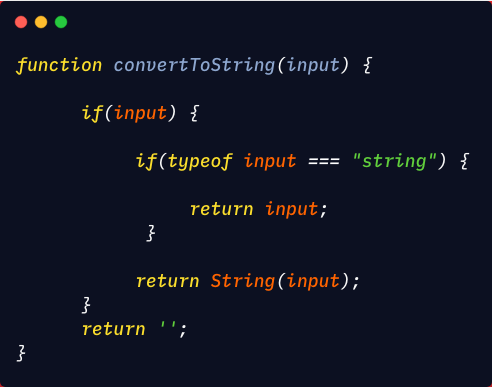
First we need to convert the input to a string, just in case a non-string is passed into the function:

link toΒ code

Now we need to split the input to separate words using RegEx:

/[A-ZxC0-xD6xD8-xDE]?[a-zxDF-xF6xF8-xFF]+|[A-ZxC0-xD6xD8-xDE]+(?![a-zxDF-xF6xF8-xFF])|d+/g

The explanation of the above RegEx can be found here.

What this will do is , 
For input: "Text is 123 test TText123test !!12 --!~@#$%%^&*( (test)"
The regular expression will match 
[Text, is, 123, test, T, Text, 123, test, 12, test]

Now we can use the match method of the string object convert it to words using our RegEx.

link toΒ code

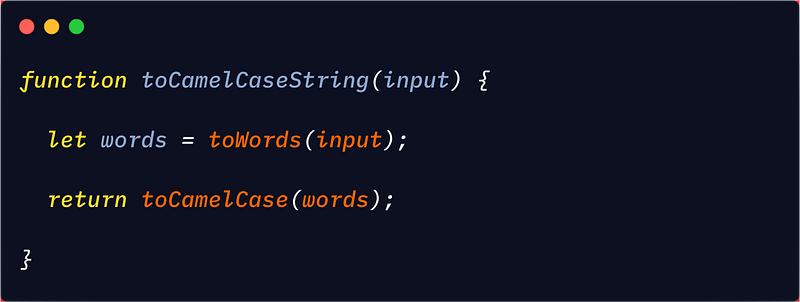
Now that we have the string converted to words, we can convert it to camel case.

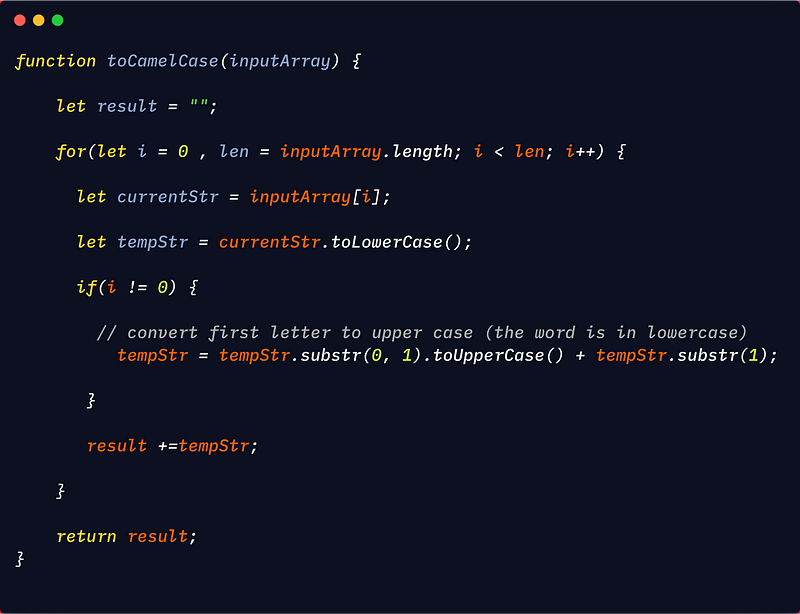
Let’s create a function that accepts an array of strings. For the string at index 0, convert all the characters of the string to lowercase. For all other strings in the array, convert only the first character of the string to uppercase and convert all other characters as lowercase.

Here we converted every element to lowercase on each iteration of the loop. If the index is not 0 then convert the first character as uppercase.

link toΒ code

Now let’s combine all the above code:

link toΒ code

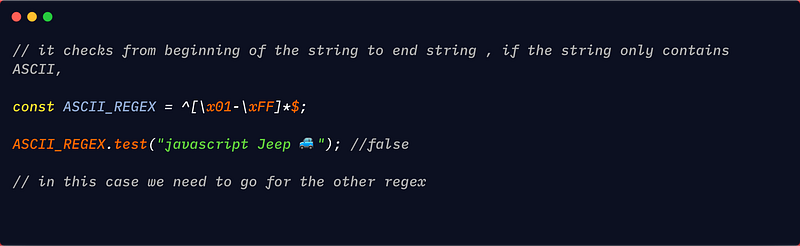
NOTE: This doesn’t work if the string contains character which are not ASCII. To support that, we need to use a more complex regular expression.

To accomplish this, we test if a string contains non-ASCII character:


The RegEx to match non-ASCII code can be found here. To make it work with non-ASCII, simply replace the RegEx in the toWords function.

If you find this helpful surprise 🎁 me here.

Share if you feel happy πŸ˜ƒ πŸ˜† πŸ™‚Β .

Follow Javascript JeepπŸš™ if you feelΒ worthy.


https://gitconnected.com/learn/javascript

First class Function in Javascript.

Learn about what is first class function and how to use itΒ , in Javascript.


A programming language is said to support First class functionΒ , if

  1. A function can be assigned to a variable,

2. A function can be passed as an argument,

3. A function can be returned from other function.

A function can be assigned to a variable


A function can be passed as an argument


A function can be returned from other function

A function which is returned from other function is called β€œHigher order function”.


Do you knowΒ ?

window.print() ; // this is open the print preview in browser

For writing ✍️ this post I πŸ€·πŸ»β€β™‚οΈ referred MDN 🌟 πŸ’– 😜 .

Learn new way of creating random numbers here

β€”β€Šβ€”β€Šβ€”β€Šβ€”β€Šβ€”β€Šβ€”β€Šβ€”β€Šβ€”β€Šβ€”β€Šβ€”β€Šβ€”β€Šβ€”β€Šβ€”β€Šβ€”β€Šβ€”β€Šβ€”β€Šβ€”β€Šβ€”β€Šβ€”β€Šβ€”β€Šβ€”

If you find this helpful surprise 🎁 me here.

Share if you feel happy πŸ˜ƒ πŸ˜† πŸ™‚Β .

Follow Javascript JeepπŸš™ if you feel worthy.

Understand the bind() function in Javascript


TheΒ .bind() function allows as to create a function by setting a custom this value. The bind function returns a function that is callable like a normal function and can also be passed to other functions.

When we need to go for bindΒ ?

Consider that we have an object:

window.Name  = "Window";
var JsJeep = {
    Name  : "Javascript Jeep πŸš™ πŸš—",
    greet : function() {

console.log(" πŸ‘‹ from " + this.Name);
    }
}

When we call the function greet with the JsJeep object:

JsJeep.greet(); //  πŸ‘‹from Javascript Jeep πŸš™ πŸš—

What if we store the function ina other variable and call the function:

var greet = JsJeep.greet;
greet(); //  πŸ‘‹ from Window.

The this points to "Window" because this inside the greet function is global window object, so we need to tell the browser specifically use JsJeep object that it should refer to. This is when bind is used.

Let’s see another example, then we understand the bind. When we do the same inside a setTimeout:

setTimeout(JsJeep.greet , 0); //  πŸ‘‹ from Window

Inside the setTimeout function the value of this will again be window because we are passing the reference of greet function to setTimeout, and the window object is executing the greet function call after 0 milliseconds.

The above setTimeout code is equivalent to

var func = JsJeep.greet;
setTimeout(func, 0); // which is similar to above case.

To solve the above problem, we use the bind function which allows us to specify the value of this inside a function.

Syntax

functionToBind.bind(ourCustomThisObject, argumentsToFunction) β†’ the additional arguments are optional.

Solution for above problems:

var fun = JsJeep.greet;
var newFun = fun.bind(JsJeep);
newFun(); //  πŸ‘‹ from Javascript Jeep πŸš™ πŸš—
setTimeout(newFun, 0); //  πŸ‘‹from Javascript Jeep πŸš™ πŸš—

So we got solved the problem.

Let’s see some tricky areas.

1. What will happen when we pass null instead of JsJeep object

 var fun = JsJeep.greet;
 var newFun = fun.bind(null); // then we are binding nothing
  • There are two cases if we use strict mode then the this will be nullΒ .
  • If we are in non-strict mode then the this will be window object.

2. We can’t change the this value once the bind is doneΒ .

var fun = JsJeep.greet;
var bindFun= fun.bind( {Name: "Balaji"} );

bindFun = bindFun.bind( {name: "Raju"} );
bindFun(); //  πŸ‘‹ from Balaji

The reason is that the bindFun has fixed this after the first invocation, and we can’t change that afterward.

3. How to find if a function is bound functionΒ .

The name property of a bound function is prefixed with β€œbound”

log(JsJeep.greet.name) // greet
var fun = JsJeep.greet;
var bindFun= fun.bind( JsJeep );
log(bindFun.name); // bound greet

4. If a property of the object is updated then the value of the property is also updated inside the bind function.

var JsJeep = {
    Name  : "Javascript Jeep πŸš™ πŸš—",
    greet : function() {

console.log(" πŸ‘‹ from " + this.Name);
   }
}
var fun = JsJeep.greet;
var bindFun= fun.bind( JsJeep );
JsJeep.Name = "New Jeep 🚘 "; //updating the property.

bindFun(); //   πŸ‘‹  from New Jeep 🚘

Notes

For writing ✍️ this post I πŸ€·πŸ»β€β™‚οΈ referred MDN and javascrip.info and some answers from StackOverflowΒ , thanks πŸ™ to them 🌟 πŸ’– 😜 .

β€”β€Šβ€”β€Šβ€”β€Šβ€”β€Šβ€”β€Šβ€”β€Šβ€”β€Šβ€”β€Šβ€”β€Šβ€”β€Šβ€”β€Šβ€”β€Šβ€”β€Šβ€”β€Šβ€”β€Šβ€”β€Šβ€”β€Šβ€”β€Šβ€”β€Šβ€”β€Šβ€”

Learn new way of creating random numbers here

β€”β€Šβ€”β€Šβ€”β€Šβ€”β€Šβ€”β€Šβ€”β€Šβ€”β€Šβ€”β€Šβ€”β€Šβ€”β€Šβ€”β€Šβ€”β€Šβ€”β€Šβ€”β€Šβ€”β€Šβ€”β€Šβ€”β€Šβ€”β€Šβ€”β€Šβ€”β€Šβ€”

If you find this helpful surprise 🎁 me here.

Share if you feel happy πŸ˜ƒ πŸ˜† πŸ™‚Β .

Follow Javascript JeepπŸš™ if you feel worthy.


https://gitconnected.com/learn/javascript

Take screenshot πŸ“±with Javascript .

Learn how to take screenshot with javascriptΒ .

To use the webcam or microphone, we need to request permission.We can request the access using getUserMedia() functionΒ ,

The getUserMedia() function takes constraint as argumentΒ . The constraint object contains either you need to access webcamΒ , audio, or both.

If you want to access the webcam, the parameter should be {video: true}. To use both the microphone and camera, pass {video: true, audio: true}.

Let’s create the basic html to display the videoΒ ,

So when the user click on the capture then the vi


So when the user click on the capture buttonΒ ,then the request for the video is askedΒ , then once the permission is granted the video stream is received on the success functionΒ , and then the video stream is set as the source for the video element.


You can try yourself to take screenshot and download as image in the browser. You can also add filter while drawings the image to the canvasΒ .

Learn about unknown things about ** operator here.

If you find this helpful surprise 🎁 me here.

Share if you feel happy πŸ˜ƒ πŸ˜† πŸ™‚Β .

Follow Javascript JeepπŸš™ if you feel worthy.

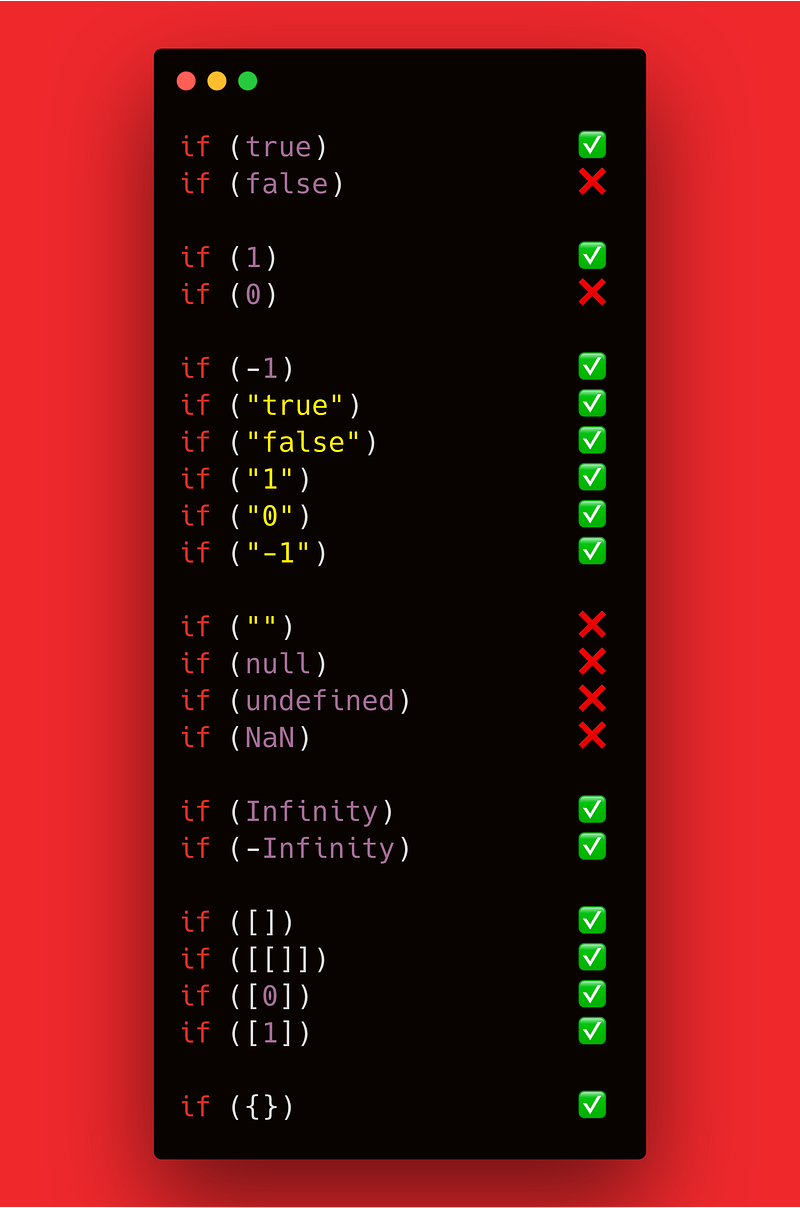
Cheatsheet for if Statement in Javascript .

Learn the every behaviour of if statement of different values,


Learn about unknown things about ** operator here.

If you find this helpful surprise 🎁 me here.

Share if you feel happy πŸ˜ƒ πŸ˜† πŸ™‚Β .

Follow Javascript JeepπŸš™ if you feel worthy.

Check if your variable is an Array in Javascript.

Learn Different ways to check if a variable is array in Javascript.

Using Array.isArray()


Using toString() method in Object, this method convert the argument to specific type name,

If we pass Object.prototype.toString.call(1) returns "[object Number]"Β , so if we pass array then it results in "[object Array]"Β .


Using instanceof keyword

arr instanceof Array;

Using toString method on the variable

Let’s assume we have a variable a = 10Β , when we call a.constructor.toString() it returns "function Number() { [native code] }” . Similarly if we pass array then instead of number it returns Array.


Learn about unknown things about ** operator here.

If you find this helpful surprise 🎁 me here.

Share if you feel happy πŸ˜ƒ πŸ˜† πŸ™‚Β .

Follow Javascript JeepπŸš™ if you feel worthy.

Design a site like this with WordPress.com
Get started