Exponentiation ** operator in Javascript

The ** operator returns the result of the first variable to the power of the second variable. That is, Math.pow(a,b).

Photo by Crissy Jarvis onΒ Unsplash
var a = 2;
var b = 5;
a ** b; // 32
Math.pow(a, b); // 32

If we do like a ** b ** cΒ , then the operation is computed from right-to-leftΒ , that is a ** (b**c)

var a = 5, b = 2, c = 2;
a ** b ** c; // 625
// Execution order of a ** b ** c;
(5 ** (2 ** 2) )
(5 ** 4)
625

You cannot put a unary operator (+/-/~/!/delete/void/typeof) immediately before the base number.

// Invalid Operations
+a ** b;
-a ** b;
~a ** b;
!a ** b;
delete a ** b;
void a ** b;
typeof a ** b;
// All the above operation are invalid and result in 
Uncaught SyntaxError: Unary operator used immediately before exponentiation expression. Parenthesis must be used to disambiguate operator precedence

Handling negative numbers

-2 ** 2; //invalid
// The above expression can be converted into 
(-2) ** 2; // 4
(-2) ** 3; //-8 

Any operation on NaN is NaN

NaN ** 1; //NaN
NaN ** NaN;  // NaN

What will happen on using undefined:

1  ** undefined; // NaN
// because
1 ** Number(undefined);
1 ** NaN; // NaN

Similarly when we do ** on null, Number(null) β†’ 0, so the power of 0 is 1.

10 ** null; // 1
// because
10 ** Number(null); // Number(null) --> 0
10 ** 0; // 1

If you find this helpful surprise 🎁 me here.

Share if you feel happy πŸ˜ƒ πŸ˜† πŸ™‚Β .

Follow Javascript JeepπŸš™πŸ’¨


https://gitconnected.com/learn/javascript

How to insert element based on index in an array.

Learn how to insert an element in specified index of the array in Javascript.

The splice() method changes the contents of an array by removing or replacing existing elements and/or adding new elements in-place(in original array).


The splice method will take three argument β†’ startΒ , deleteCount(optional), items to add (optional)Β .

In the above program we are deleting 0 elements from index 2 and adding 3 into 2 index.

We can also add multiple elements into itΒ .

var array = [1,2,4,5];
array.splice(2, 0, 3, 4, 3, 4); // [1,2,3,4,3,4,4,5]

If you find this helpful surprise 🎁 me here.

Share if you feel happy πŸ˜ƒ πŸ˜† πŸ™‚Β .

Follow Javascript JeepπŸš™ if you feel worthy.

Create beautiful boxes using the outline CSS property

outline is a line outside the border of a container. Let’s create a simple rectangle and apply an outline and see how cool 😎 it is.

The syntx for ourline is outline: size type color;


The above code will create a beautiful frame πŸ–ΌΒ .

The available values are

outline: auto β†’ Permits the user agent to render a custom outline style.


outline: dotted β†’ The outline is a series of dots instead of a solid line.


outline: double β†’ The outline is two single lines. The outline-width is the sum of the two lines and the space between them.


We can also set the offset of the outline using outline-offset property.


outline: dashed β†’ The outline is a series of short line segments.


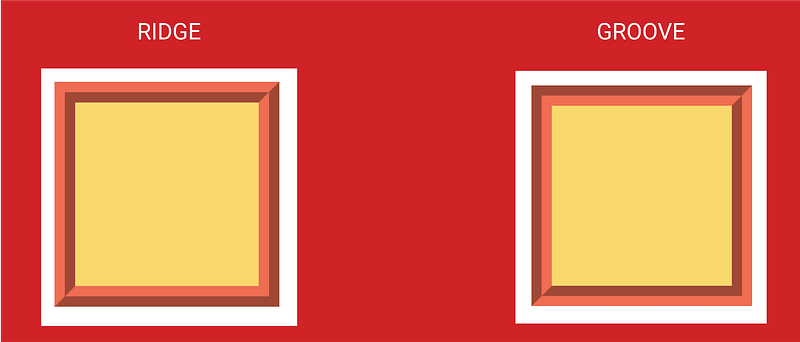
outline: groove β†’The outline looks as though it were carved into the page.


outline: ridge β†’ The opposite of groove. The outline looks as though it were extruded from the page.


Difference between groove and ridge.


outline: inset β†’ The outline makes the box look as though it were embedded in the page.


outline: outset β†’ The opposite of inset. The outline makes the box look as though it were coming out of the page.


You can set the outline as none, so that it doesn’t have an outline.

If you find this helpful surprise 🎁 me here.

Share if you feel happy πŸ˜ƒ πŸ˜† πŸ™‚Β .

Follow Javascript JeepπŸš™ if you feel worthy.


https://gitconnected.com/learn/css

Three different ways to loop through JavaScript objects

Learn how to loop through objects in Javascript.

var object = {
  name : "Javascript Jeep",
  status : "😎",
  icons : "πŸš—"
}

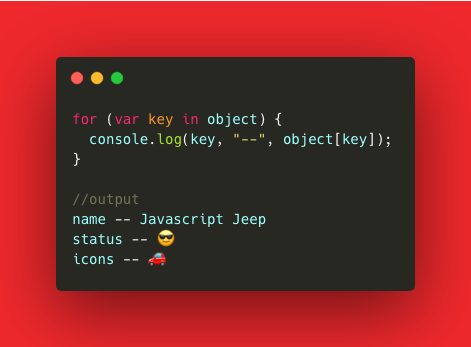
Using for..in


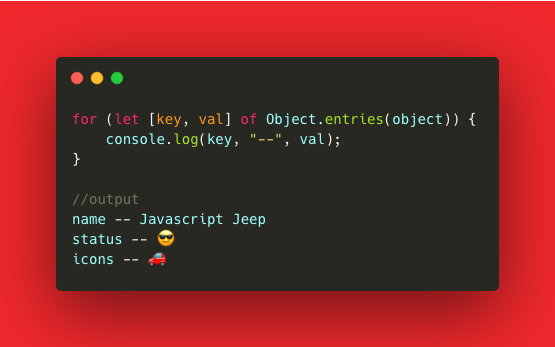
With ES6, we can use Object.entries to loop through each entry of the object. The Object.entries method returns an array of [key, value].


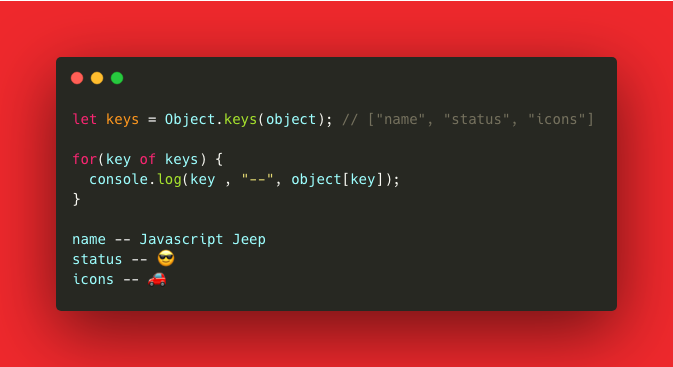
We can also use Object.keys which will return an array filled with keys of the object. Using that array we can loop through the object.


If you know some other ways to loop through object leave a comment.

If you find this helpful surprise 🎁 me here.

Share if you feel happy πŸ˜ƒ πŸ˜† πŸ™‚Β .

Follow Javascript JeepπŸš™ if you feel worthy.


https://gitconnected.com/learn/javascript

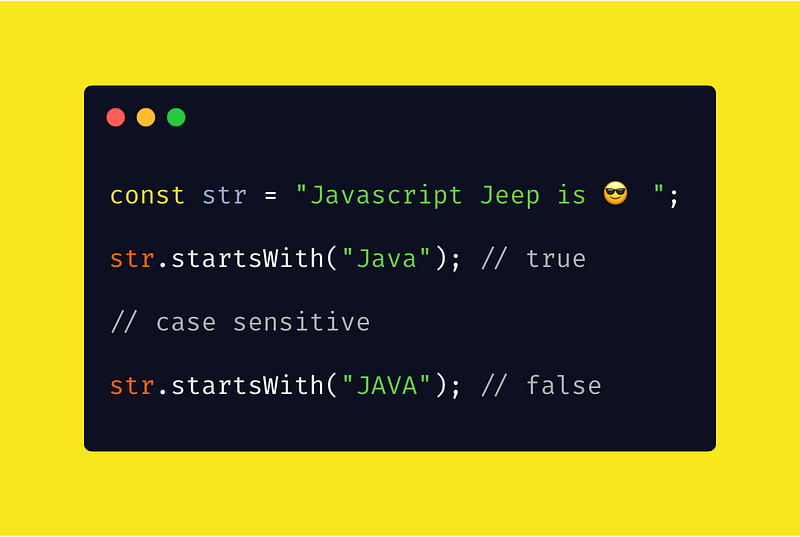
String methodsΒ : startsWith in Javascript.

Learn about the startsWith method of string object in Javascript.

The startsWith() method returns true if the given characters are found at the beginning of the string, otherwise, false.


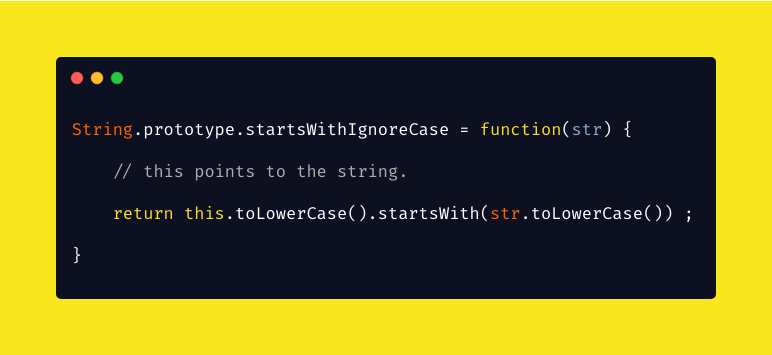
If you want this method to be non case-sensitive then we can write a custom function


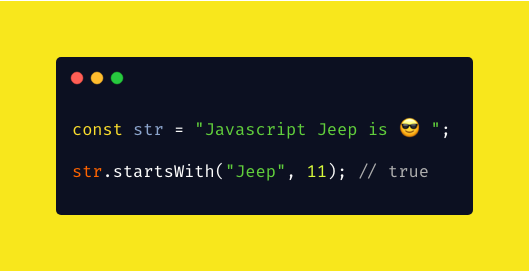
We can also specify the position from which to begin searching for searchString.


If you find this helpful surprise 🎁 me here.

Share if you feel happy πŸ˜ƒ πŸ˜† πŸ™‚Β .

Follow Javascript JeepπŸš™ if you feel worthy.

Creating notification bell πŸ”” in javascript.

Learn how to create notification in Javascript.

The Notification API allows you to create notification on the web page.

To create notification first we need to change the notification default settings.


Here change the Notification block to allow. So the notification will be displayedΒ .

To check for notification support in the browserΒ ,


To check thr current permission(denied/ granted) on the current page, we can user Notification.permission read only propertyΒ .If the permission is denied we need to enable it. If the permission is granted then we can create notificationΒ .

To create a notification


The above code will create a new notification with icon.

If we don’t need the iconΒ , we can simply use

var notification = new Notification("hi there");

If you find this helpful surprise 🎁 me here.

Share if you feel happy πŸ˜ƒ πŸ˜† πŸ™‚Β .

Follow Javascript JeepπŸš™ if you feel worthy.

Referred from mozilla.

Enabling full screen in Javascript.

Learn how to enable full screen using Javascript.

We can use requestFullscreen() method on any element to make the element as full screen. requestFullscreen() method makes an asynchronous request to make the element be displayed in full-screen mode.

We can check if any other element is already in fullscreen mode by using document.fullscreenElementΒ .

To exit fullscreen we can use document.exitFullscreen()


The above code will make the document to go full screen. To make a video as fullscreen


If you find this helpful surprise 🎁 me here.

Share if you feel happy πŸ˜ƒ πŸ˜† πŸ™‚Β .

Follow Javascript JeepπŸš™ if you feel worthy.

Generate random numbers in JavaScript using Crypto, without Math.rand()

Learn how to get a random number without using Math.rand()

The Crypto.getRandomValues() method lets you get cryptographically strong random values.

Syntax: getRandomValues(typedArray)

Argument: typedArray β†’ Is an integer-based TypedArray, which can be an Int8Array or an Uint8Array or an Int16Array or a Uint16Array or an Int32Array or a Uint32Array. All elements in the array are going to be filled with random numbers.

The follow example will generate an array of 10 random integers. You can modify this to your needs.


If you need a single value, you simply create an array of length 1 or access the first element typedArray[0].

The typed array is filled with random values, the max value in the above example is 2⁸-1 because we are passing Uint8Array. If we pass UInt16Array then the array is filled with the max value of 2¹⁢- 1.

To get random values between 0 to 1 then you can divide the result by respective typedArray maxValue. If we use UInt8Array then we need to divide the value by (Math.pow(2,32)-1).

To learn about how to get a random number in the old way read here.

If you find this helpful surprise 🎁 me here.

Share if you feel happy πŸ˜ƒ πŸ˜† πŸ™‚Β .

Follow Javascript JeepπŸš™ if you feel worthy.


https://gitconnected.com/learn/javascript

SelectingΒ , clearing and focusing on input in Javascript.

Learn how to select text, focus and clear the text in input box in Javascript.

input.value = "" β†’ this will make the input value to empty string.

input.focus() β†’ this method will set focus on the input box.

input.select() β†’ this will select the text in the input box.


If you find this helpful surprise 🎁 me here.

Share if you feel happy πŸ˜ƒ πŸ˜† πŸ™‚Β .

Follow Javascript JeepπŸš™ if you feel worthy.

Remove duplicate values of the array in Javascript.

Learn how to remove the duplicate values in the array

Simple Way is using Set (which only contains unique value).

var array = [1,2,3,4,1,2,3];
var unique = [... new Set(array)] ;
//or 
var unique = Array.from (new Set(array) );

Another way is

var elements = [1,2,3,4,1,2,3];

var uniqueArray = elements.filter(function(element, currentIndex) {
      return elements.indexOf(element) == currentIndex;
});

The filter() method creates a new array with all elements that pass the test.

The indexOf() method returns the first index at which a given element can be found.

Consider we have an array elements = [1,2,3,1]

test case

element = 1, index = 0  
   elements.indexOf(1) == 0 // true
element = 2, index = 1
   elements.indexOf(2) == 1// true
element = 3, index = 2
    elements.indexOf(3) == 2// true
element = 1, index = 3
    elements.indexOf(1) == 3// false because the indexOf 1 is 0 so this test is failed , 1 is rejected πŸ™…β€β™‚οΈ .

You can read about set in details here.

If you find this helpful surprise 🎁 me here.

Share if you feel happy πŸ˜ƒ πŸ˜† πŸ™‚Β .

Follow Javascript JeepπŸš™ if you feel worthy.

Design a site like this with WordPress.com
Get started